
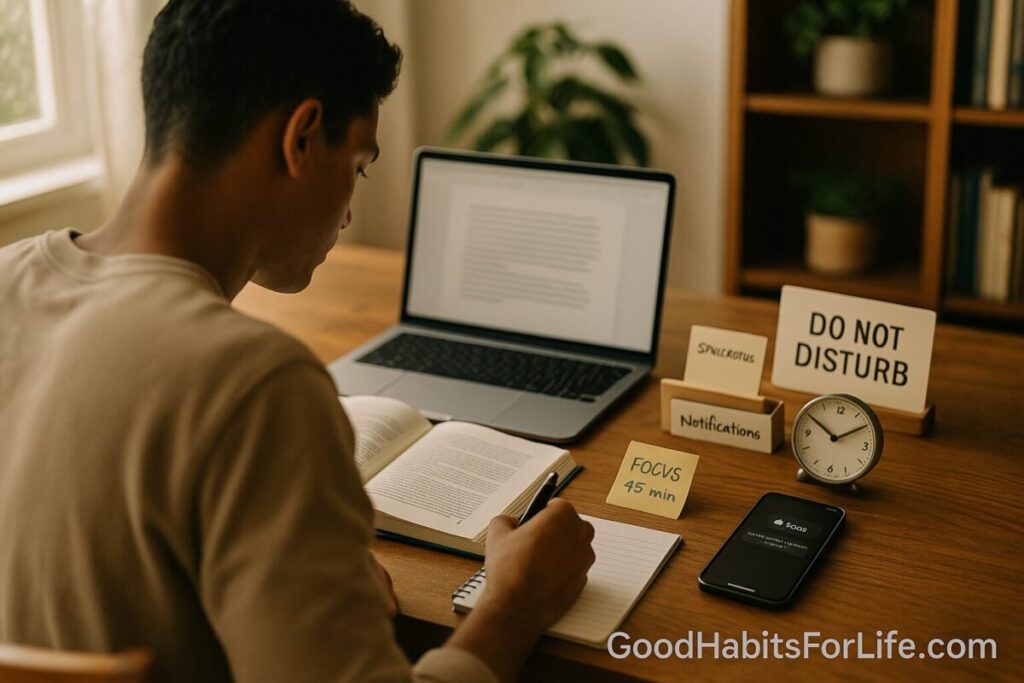
Phone-Proof Studying: Notification Hygiene 2025
Phone-Proof Your Study: Notification Hygiene (2025)
Table of Contents
🧭 What & Why
Notification hygiene is the set of routines that reduce, batch, and route phone alerts so you can protect deep study time without missing what truly matters. Why it matters:
-
The mere presence of your smartphone (even face-down and on silent) measurably reduces available cognitive capacity—leaving fewer resources for memory and problem-solving. Chicago Journals
-
Unattended buzzes and banners derail performance on demanding tasks—even if you don’t open the phone. PubMed
-
Task switching has costs. Switching attention—even for a moment—adds resumption lag and mental effort; those tiny costs add up across a session. APA
-
At the class/system level, digital distraction tracks with lower scores. PISA 2022 analyses associate classroom device distraction with lower mathematics performance. OECD
-
Sleep fuels learning. Evening light from screens delays circadian timing and reduces next-morning alertness; most learners need 7–10 hours depending on age. PNAS+1
Bottom line: control the when, what, and where of notifications to reclaim attention, learning efficiency, and recall.
✅ Quick Start: Phone-Proof in 10 Minutes
Follow this once; save as your default “Study Focus.”
-
Physically relocate the phone (2 min). Put it in a drawer/backpack, out of reach and line-of-sight. (Proximity itself saps bandwidth.) Chicago Journals
-
Enable a study preset (3 min).
-
iPhone: Settings → Focus → Work/Study. Allow only emergency contacts + essential services (2FA/ride pickup). Silence others; schedule to auto-activate. Apple Support
-
Android: Settings → Digital Wellbeing → Focus mode. Pause social/games/news; set a recurring schedule. Google Help
-
-
Batch notifications (2 min). Turn off auto-alerts for chat/social/email; schedule delivery at 13:00 & 19:00 (or your times). Batching reduces interruption load and improves end-of-day productivity. Squarespace+1
-
Set app timers (1 min). Cap the top 2 time-sink apps (e.g., 15–20 min/day on weekdays).
-
Start a 50/10 or 25/5 cycle (2 min). Timer on laptop/watch; phone stays away. Log any slip in a simple tally (“2 interruptions this session”) to adjust rules later.
📅 7-Day Starter Plan (with checkpoints)
Goal: One 90–120-minute study block daily with near-zero unplanned alerts.
Day 1 – Baseline & Build
-
Install/activate Focus preset (iOS/Android). Create two allowed lists: Emergency (family) and Essential (auth/transport).
-
Turn off badges/banners/sounds for social, retail, news.
-
Checkpoint: Phone in drawer? Only whitelisted contacts can break through?
Day 2 – Batching & Timers
-
Email, chat, and socials → scheduled summaries at 13:00 & 19:00.
-
Add app timers for top two distractors.
-
Checkpoint: 2 batches set? Daily total < 60 min recreational.
Day 3 – Environment & Anchors
-
Desk cue: a sticky “📚 Deep Work 09:30–11:00”.
-
Use a dumb timer (kitchen timer/watch).
-
Checkpoint: 90+ minutes continuous?
Day 4 – Sleep Shield
-
Set Screen-Curfew alarm 90 minutes before bedtime; auto-enable Sleep Focus.
-
Replace late scrolling with print reading. (Evening screens delay circadian timing.) PNAS
-
Checkpoint: Slept ≥7–9 h (adults) / 8–10 h (teens)? CDC
Day 5 – Social Norms
-
Post your Study Status in key group chats/class servers.
-
Use autoresponders (“Studying 10–12, will reply after 1pm”).
-
Checkpoint: Fewer pings during your block?
Day 6 – Review & Tighten
-
Check your Interruption Log: which app/contact leaks through?
-
Remove 1 more app from allowed list; bump app timer down by 5 minutes.
Day 7 – Stress-Test
-
Do a 2-hour session before a deadline.
-
If urges spike, grab a sticky note and “park” the thought; process during the break.
-
Checkpoint: ≥90 minutes sustained focus; urge spikes decline by end of week.
🧠 Techniques & Frameworks That Work
1) Out-of-sight rule. Place phone outside visual field; nearby phones (even silent) tax working memory. Chicago Journals
2) Batch notifications. Deliver summaries 1–3 times/day. Evidence shows batching or disabling notifications improves perceived productivity and reduces strain. Squarespace+1
3) Single-task cycles. Use 50/10 (for reading/problem sets) or 25/5 (for drills). During breaks, no feeds—walk, water, stretch. Task switching creates resumption lags and added cognitive load. APA
4) Two lists, not zero:
-
Allowed: emergency contacts, calendar, authenticator, ride/food arrival.
-
Delayed: everything else (batch or silence).
5) Sleep-first learning. Protect sleep with an evening screen curfew; e-readers/phones before bed delay melatonin and next-morning alertness. PNAS
6) Urge surfing. When you feel the “check phone” pull, set a 2-minute timer; urges peak and pass. Park any “must-do” in a capture sheet.
7) Location-linked Focus. Auto-enable Focus at the library/study room; auto-disable when you leave. (Supported on iOS and Android.) Apple Support+1
👥 Audience Variations
Students (school/college):
-
Keep a shared calendar with family/roommates; whitelist only those during study blocks.
-
For group projects, agree on asynchronous check-ins at fixed windows instead of live pings.
Parents returning to study:
-
Create a family “emergencies-only” rule with a keyword (“911”) that bypasses Focus; everything else waits for the batch.
Working professionals (evening learners):
-
Use Focus at work + Sleep Focus at night; guard commute time for spaced review.
-
Batch corporate chat notifications after hours; most messages can wait for the next block.
Teens:
-
Build the preset together with a parent; set app timers and Focus schedules that align with homework windows.
-
Remember: teens typically need 8–10 hours of sleep; devices out of the bedroom helps. CDC
⚠️ Mistakes & Myths to Avoid
-
Myth: “I can ignore notifications.”
Reality: Even unattended pings impair performance. PubMed -
Mistake: Turning everything off without norms.
Fix: Share your Study Status + batch times so friends/teams know when to expect replies. -
Myth: “Having the phone face-down is enough.”
Reality: Mere presence reduces cognitive capacity; put it out of sight. Chicago Journals -
Mistake: Studying on the bed with late-night screens.
Fix: Last 60–90 min of the day = print or amber-filtered content; better sleep, better recall. PNAS
💬 Real-Life Examples & Scripts
Set expectations in group chat (copy-paste):
“Heads up — I’m in Study Focus 9–11am daily. I’ll check messages at 1pm. If urgent, call twice or text ‘911’ and it’ll bypass Focus.”
Family message:
“I’m studying 7–9pm. If it can wait, I’ll reply at 9:15. If it can’t, call and it’ll ring through.”
Class server status:
“📚 Deep Work until 16:30 — please tag me only for blockers; I’ll sweep threads at 17:00.”
Self-talk for urges:
“Not now; I have a batch at 1pm. I’ll park this thought on my sticky.”
🛠️ Tools, Apps & Resources (pros & cons)
-
iOS Focus — deep controls, contact/app allows, schedules, location triggers; syncs across Apple devices. Pros: granular filters. Cons: setup learning curve. Apple Support
-
Android Focus Mode (Digital Wellbeing) — pause distracting apps, schedule/breaks. Pros: simple, system-level. Cons: vendor flavor varies by device. Google Help
-
App timers (built-in) — per-app daily limits; nudge over hard block.
-
Website blockers (e.g., Freedom / Cold Turkey / LeechBlock) — blocks across devices/browsers.
-
Analog timer + paper capture — low-friction, no screen pull.
📌 Key Takeaways
-
Phone out of sight + Focus preset + batched alerts = maximum study attention. Chicago Journals+2Apple Support+2
-
Notifications you don’t open still hurt performance; design for silence by default. PubMed
-
Batching/turning off alerts measurably improves productivity and reduces strain. Squarespace+1
-
Protect sleep (no late screens) to consolidate learning. PNAS
❓ FAQs
1) Do I need to go “phone-free” to study well?
No. You need control. Keep critical paths (family, logistics) allowed; batch everything else 1–3 times/day.
2) What if I miss something important?
Whitelist key contacts, enable “Allow Repeated Calls” (iOS) or starred contacts (Android). Emergencies still reach you. Apple Support+1
3) How long should a study block be?
Start with 50/10; scale to 90–120 minutes for reading and problem sets as stamina builds.
4) Does “face-down on the desk” work?
Better than nothing, but out of sight is superior; proximity alone reduces cognitive capacity. Chicago Journals
5) Is batching really better than instant alerts?
Yes. Studies report higher productivity and lower strain when notifications are batched or disabled. Squarespace+1
6) How do I handle group projects?
Create shared check-in windows (e.g., 13:00 & 19:00), pin them, and mute outside those windows; use threads for clarity.
7) I keep slipping and opening apps during breaks.
Shorten breaks to 5 minutes; replace feeds with a walk/water/stretch micro-routine. Add stricter app timers for the next 7 days.
8) Any science behind “no screens before bed”?
Yes. Evening light from screens delays your body clock and reduces next-morning alertness. PNAS
9) Does multitasking make me faster?
It can feel fast, but switching costs and resumption lag mean overall efficiency drops for complex tasks. APA
10) What if school blocks my phone anyway?
Perfect — extend the same rules at home. Keep Focus schedules synced to homework windows.
📚 References
-
Ward, A. F., Duke, K., Gneezy, A., & Bos, M. W. (2017). Brain drain: The mere presence of one’s own smartphone reduces available cognitive capacity. Journal of the Association for Consumer Research. https://www.journals.uchicago.edu/doi/abs/10.1086/691462 Chicago Journals
-
Stothart, C., Mitchum, A., & Yehnert, C. (2015). The attentional cost of receiving a cell phone notification. Journal of Experimental Psychology: Human Perception and Performance. https://pubmed.ncbi.nlm.nih.gov/26121498/ PubMed
-
Wilmer, H. H., Sherman, L. E., & Chein, J. M. (2017). Smartphones and cognition: A review. Frontiers in Psychology. https://pmc.ncbi.nlm.nih.gov/articles/PMC5403814/ PMC
-
OECD (2024). Students, digital devices and success. (PISA 2022 findings). https://www.oecd.org/content/dam/oecd/en/publications/reports/2024/05/students-digital-devices-and-success_621829ff/9e4c0624-en.pdf OECD
-
Fitz, N. et al. (2019). Batching smartphone notifications can improve well-being. (Study report). https://static1.squarespace.com/…/2019%2BFitz%2BBatching.pdf Squarespace
-
Ohly, S. & Baethge, A. (2023). Effects of task interruptions caused by notifications… (Randomized field experiment). https://pmc.ncbi.nlm.nih.gov/articles/PMC10244611/ PMC
-
Chang, A.-M., et al. (2015). Evening use of light-emitting eReaders negatively affects sleep, circadian timing, and next-morning alertness. PNAS. https://www.pnas.org/doi/10.1073/pnas.1418490112 PNAS
-
CDC (2024). About Sleep — How much sleep do I need? https://www.cdc.gov/sleep/about/index.html CDC
-
American Psychological Association. Multitasking: Switching costs. https://www.apa.org/topics/research/multitasking APA
-
Apple Support. Set up a Focus on iPhone. https://support.apple.com/guide/iphone/set-up-a-focus-iphd6288a67f/ios Apple Support
-
Google Support. Manage time with Focus mode (Android). https://support.google.com/android/answer/9346420 Google Help