
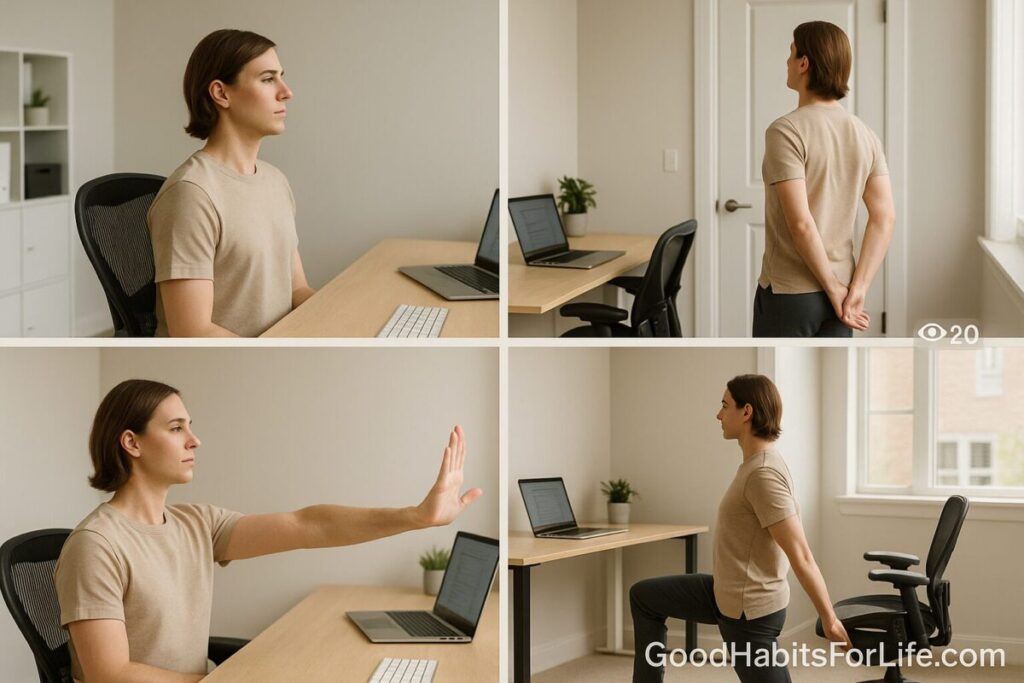
Desk Stretch Circuit (2025 Remote Edition)
Desk Stretch Circuit (2025 Remote Edition)
Table of Contents
🧭 What This Circuit Is & Why It Works
The Desk Stretch Circuit is a short, repeatable sequence that counters common workstation stresses—forward head, rounded shoulders, stiff hips, tight forearms—and builds micro-movement into long desk blocks. Over time, small, frequent bouts of movement reduce discomfort and help you maintain neutral joint positions while you work. Neutral posture (head over shoulders, relaxed shoulders, straight wrists) reduces strain on muscles and tendons during computer tasks. OSHA
Regular movement also supports overall health by reducing sedentary time—global guidelines emphasize “sit less, move more” for adults and older adults. World Health OrganizationPubMed
Add eye-rest to your routine: the 20-20-20 rule (every 20 minutes, look 20 feet away for 20 seconds) eases digital eye strain discomfort for many people. aoa.orgAAO
✅ Quick Start (Today)
-
Set your workstation to neutral: screen at eye level, keyboard and mouse close, wrists straight, chair supporting a slightly reclined torso. OSHA+1ergo.human.cornell.edu
-
Schedule three stretch alarms: at +60, +120, and +180 minutes from your start time.
-
Run one full circuit (below). Time it—aim for 3–5 minutes.
-
Layer the eye break: every Pomodoro or email send, do 20-20-20. aoa.org
-
Log how you feel (neck, shoulders, back, wrists) on a 0–10 comfort scale.
🛠️ The 8-Move Desk Stretch Circuit (3–5 minutes)
Do 1 set of each move, 20–30 seconds, flowing top-to-bottom. Breathe easy; no pain.
-
Neck Lengthener (Upper Traps) — Sit tall. With right hand, gently draw left ear toward right shoulder; reach left fingertips toward floor. Switch.
-
Chin Tucks (Cervical Retractors) — Glide head straight back (double-chin), hold 2s, release; 8–10 reps to reduce forward-head.
-
Chest Opener at Door/Wall — Forearm on doorframe or wall, elbow ~90°. Step through until a mild pec stretch; switch sides.
-
Shoulder Rolls — Slow 10 forward/10 back to unglue rounded shoulders.
-
Wrist & Forearm Reset — Arms straight, palms out (“stop” sign), gently pull fingers back; flip palms in; then prayer stretch.
-
Thoracic Twist (Seated) — Cross arms over chest; rotate left/right with tall spine, 5 reps each.
-
Hip Flexor Lunge (Desk-Side) — Half-kneel or staggered stance, tuck pelvis, squeeze rear glute, gentle forward shift; switch.
-
Calf Pump + Ankle Circles — 20 heel raises, then 10 circles each direction per ankle.
Safety: Mild stretch = yes; sharp or radiating pain = stop/modify. For specific conditions, follow clinician guidance. For desk-friendly stretches, national health services publish simple options similar to the above. derbyshirehealthcareft.nhs.ukCardiff and Vale University Health Board
🗺️ 30-60-90 Habit Roadmap
Days 1–30 (Build the groove)
-
Frequency: 1 circuit, 3×/day (mid-morning, after lunch, 1–2 hours before finish).
-
Add: 20-20-20 eye break cue on timers. aoa.org
-
Checkpoints (weekly): Comfort score trend; any moves causing symptoms?
Days 31–60 (Load the habit)
-
Frequency: 2 circuits, 2×/day (AM/PM) OR 1 circuit every 60–90 minutes during heavy screen days.
-
Add: 5 minutes of walking after lunch to cut sitting time. Global guidance supports reducing sedentary time and adding regular activity. World Health Organization
Days 61–90 (Optimize & personalize)
-
Frequency: 3 circuits/day on workdays; scale to workload.
-
Add: 2×/week 10–15 min strength/mobility snack (glute bridge, bird-dog, band pull-apart).
-
Goal: Consistent posture awareness; discomfort ≤2/10 most days.
🧠 Techniques & Frameworks That Boost Results
-
Neutral-First Setup: Aim for a slight 100–110° chair recline; monitor centered and at eye height; wrists straight. Neutral positions reduce musculoskeletal strain at joints used for keyboard/mouse. ergo.human.cornell.eduOSHA
-
Pomodoro + Movement: 25/5 cycles = 4–6 movement windows per half-day—perfect for quick circuits.
-
Habit Stacking: Attach the circuit to routine anchors (first coffee, first meeting wrap, post-lunch).
-
Visual Cueing: Sticky note on monitor: “Head tall • Shoulders low • Wrists straight.” OSHA emphasizes neutral posture at these joints. OSHA
-
Micro-Breaths: Inhale 4s, exhale 6s during each hold to downshift tension.
-
Eye-Care Automation: Set a repeating 20-minute chime for 20-20-20. aoa.org
👥 Audience Variations
Students/Teens: Use phone reminders between study blocks; swap hip flexor lunge for wall quad stretch if kneeling isn’t practical. School ergonomics still follows the same neutral-posture and break principles. ergo.human.cornell.edu
Professionals (Laptop-Heavy): Prioritize external keyboard/mouse and a stand to get the screen to eye level; do wrist resets each circuit. Guidance to keep wrists straight and items close reduces strain. OSHA
Parents/Caregivers: Shorten to a 4-move “express” (neck, chest, wrists, hip flexor) you can do during bottle-prep or nap.
Seniors: Use a sturdy chair with arms; choose seated thoracic rotations and seated calf pumps; keep holds ~15–20s if balance is limited. NHS seated exercise pages offer gentle options. nhs.uk
⚠️ Mistakes & Myths to Avoid
-
Myth: “Perfect 90-90-90 all day.” Static “upright” posture for long periods isn’t ideal—vary positions and take breaks. ergo.human.cornell.edu
-
Mistake: Skipping setup. A poorly placed monitor or unsupported chair fights your stretches; fix workstation first. OSHA
-
Mistake: Forcing deep stretches. Seek gentle tension, not pain; nerves and tissues don’t like aggressive end-ranges.
-
Myth: Standing all day solves it. Standing continuously can be fatiguing; alternate positions and move. ergo.human.cornell.edu
💬 Real-Life Examples & Scripts
-
Slack/Teams Status: “BRB 3-min stretch circuit 🧍♂️—back at 11:05.”
-
Calendar Block (recurring): “Move+Eyes (3 min): neck/pecs/wrists/hips + 20-20-20.”
-
Manager Nudge: “I’m trialing micro-breaks to reduce neck pain and keep focus. Meetings that end 3 minutes early really help—ok to adopt?”
-
Self-Cue Card (monitor bezel): “Chin tuck • Shoulders low • Wrists straight • Breathe.”
🧰 Tools, Apps & Resources
-
Timers: built-in Clock app; Pomodoro timers; smartwatch chimes.
-
Hardware helpers: external keyboard/mouse, laptop stand; footrest if feet don’t reach floor; supportive chair. Setup tips: monitor centered at eye height; keep inputs close; wrists straight. OSHA
-
Reference guides: OSHA Computer Workstations eTool for neutral positions and quick checklists; WHO activity guidelines for “sit less, move more.” OSHA+1World Health Organization
-
Printable stretches: NHS desk-exercise PDFs for simple visuals. derbyshirehealthcareft.nhs.uk
📌 Key Takeaways
-
Frequent, tiny movement beats occasional long sessions during desk days. World Health Organization
-
A neutral, slightly reclined setup with straight wrists and centered monitor cuts strain. OSHAergo.human.cornell.edu
-
Run the 8-move circuit in 3–5 minutes, 2–3× per day; pair with 20-20-20 for eyes. aoa.org
-
Scale through a 30-60-90 plan; personalize to your body and job.
-
Pain = modify/skip and seek professional advice if symptoms persist.
❓ FAQs
1) How often should I do desk stretches?
Every 60–90 minutes during long computer blocks. Short, frequent breaks help maintain neutral posture and reduce discomfort. OSHA
2) What’s the best sitting posture for typing?
Neutral: ears over shoulders, relaxed shoulders, elbows near 90°, wrists straight, slight torso recline (about 100–110°) with back support. OSHAergo.human.cornell.edu
3) Do I need special equipment?
No—chair, desk edge, a wall, and a timer. External keyboard/mouse and a laptop stand help achieve neutral positions. OSHA
4) Should I stand instead of sit?
Alternate positions. All-day standing can be tiring; aim for movement variety rather than a single posture. ergo.human.cornell.edu
5) Will the 20-20-20 rule fix eye strain?
It’s a simple, commonly recommended relief strategy; combine it with good lighting, breaks, and proper screen distance. Consult an eye-care professional if symptoms persist. aoa.orgAAO
6) Can I do these with back or neck pain?
Yes—gentle range and pain-free motion only. If pain persists or radiates, stop and seek clinical advice.
7) Is one long stretch session after work enough?
Better than nothing, but spreading movement across the day is more effective for desk discomfort and posture habits. World Health Organization
8) Are there printable guides I can share with my team?
Yes—OSHA’s eTool checklists and NHS desk-exercise sheets are good starts. OSHAderbyshirehealthcareft.nhs.uk
📚 References
-
World Health Organization. WHO Guidelines on physical activity and sedentary behaviour (2020). World Health Organization
-
Bull F. et al. World Health Organization 2020 guidelines on physical activity and sedentary behaviour. Br J Sports Med (2020). PubMedrcastoragev2.blob.core.windows.net
-
OSHA. Computer Workstations eTool: Good Working Positions. OSHA
-
OSHA. Computer Workstations eTool: Additional Information (setup tips). OSHA
-
Cornell University Ergonomics. Computer Workstation Ergonomics Guidelines (recline suggestion). ergo.human.cornell.edu
-
Cornell University Ergonomics. Sitting & Standing at Work (standing is more tiring). ergo.human.cornell.edu
-
American Optometric Association. Computer vision syndrome & 20-20-20 rule. aoa.org
-
American Academy of Ophthalmology. Digital Devices and Your Eyes. AAO
-
NHS resources for desk/sitting exercises (illustrated). derbyshirehealthcareft.nhs.uknhs.uk
-
OSHA. Computer Workstations eTool: Evaluation Checklist. OSHA
⚖️ Disclaimer
This content is educational and not a substitute for personalized medical advice; consult a qualified professional for diagnosis or treatment.