
Build a Second Brain for School Without Overwhelm
Build a Second Brain for School (Without Overwhelm)
Table of Contents
🧭 What & Why
What is a “second brain”?
A simple, repeatable system to capture, organize, distill, and use your academic knowledge—so ideas live outside your head and are easy to find when you need them. You’ll keep class notes, readings, slides, problem sets, citations, and to-dos in one trusted place and run short review loops to move information into long-term memory.
Why it works
-
Retrieval practice (self-testing) boosts long-term retention compared with re-reading.
-
Spaced repetition outperforms cramming by revisiting material at expanding intervals.
-
Cognitive load management (clear structure, minimal friction) frees attention for problem-solving.
-
Interleaving & dual coding (mixing topics; combining words + visuals) deepen understanding.
The system here blends practical org frameworks (e.g., PARA for Projects/Areas/Resources/Archives) with evidence-based learning science (retrieval, spacing, interleaving, dual coding).
✅ Quick Start (Do This Today)
Goal: Get a functional second brain in 60 minutes—no perfectionism.
-
Pick your base (one only):
-
Notion (great all-in-one), Obsidian (markdown, local & fast), or OneNote (campus-friendly).
-
-
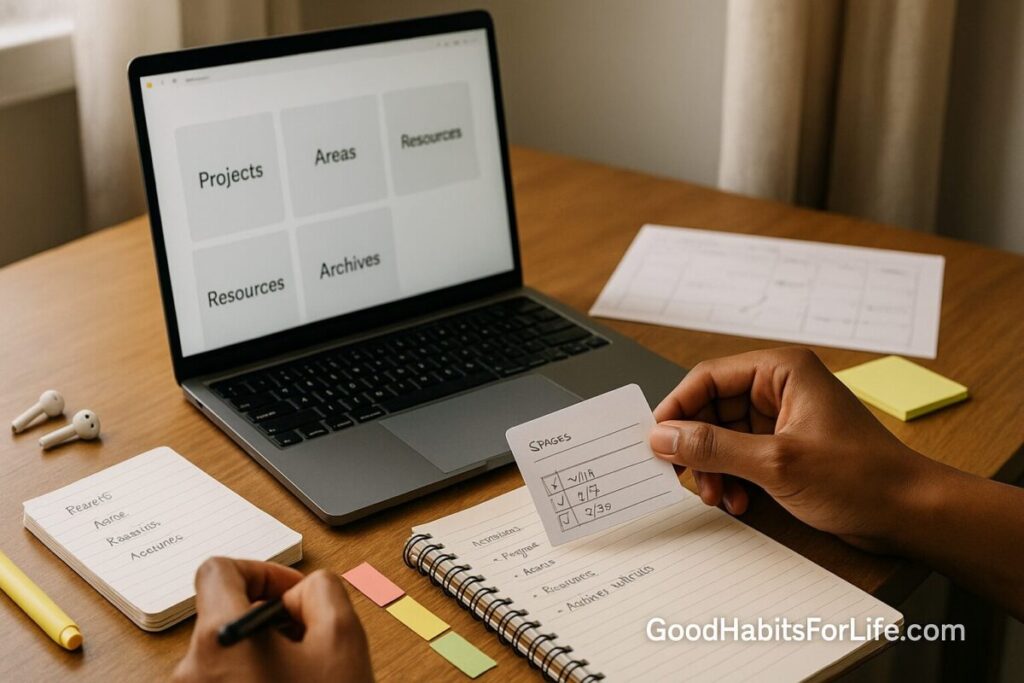
Create four top-level buckets:
-
Projects: Active outcomes with deadlines (e.g., BIO201 Lab Report 2, History Midterm).
-
Areas: Ongoing responsibilities (Courses this term, Scholarships, Wellness).
-
Resources: Reusable references (formulas, lab techniques, writing guides).
-
Archive: Done/old—keep it searchable, keep it out of sight.
-
-
Add one universal inbox: Drop raw notes, photos of whiteboards, voice memos, PDFs.
-
Make two templates:
-
Lecture Note Template: Objectives → Key Ideas → Examples → Questions → 3-Sentence Summary → Next Actions.
-
Reading Template: Citation → 5 Key Points → 3 Questions → 2 Quotes → 1 Graphic/Diagram → Action (flashcards/task).
-
-
Install two helpers (optional but powerful):
-
Reference manager: Zotero (with browser connector).
-
Flashcards: Anki (spaced repetition).
-
-
Start the review loop today:
-
After class (10–15 min): Convert highlights → 3-5 flashcards; write your 3-sentence summary.
-
Evening (10 min): Triage inbox → file into Projects/Areas/Resources/Archive.
-
Weekly (30–45 min): See Weekly Review below.
-
🗓️ 30-60-90 Habit Plan
Days 1–30: Capture & Clarity
-
Daily:
-
Use the Lecture/Reading templates every time.
-
End-of-day Inbox Zero (academic inbox only): file or delete.
-
Make 3–7 Anki cards per class/day (definitions, steps, “why” questions).
-
-
Weekly Review (30–45 min, same time):
-
Scan Projects → mark next actions for each assignment/exam.
-
Clean Areas (update course pages with summaries/links).
-
Distill Resources (trim highlights, add a one-line “Why it’s useful”).
-
Archive anything done.
-
Checkpoint (Day 30): You can find any class asset in <15 seconds; you have weekly summaries and active decks for each course.
Days 31–60: Distill & Retrieval
-
Build Exam Briefs: one page per exam (formulas, must-know concepts, common traps, practice Qs).
-
Upgrade cards: favor conceptual prompts (“Explain photosynthesis to a 10-year-old”) over verbatim.
-
Add Interleaved Practice Blocks (2×/week, 45–60 min): mix problems across chapters.
Checkpoint (Day 60): Each course has an Exam Brief; your Anki stats show regular reviews; you’ve run 4+ interleaving sessions.
Days 61–90: Express & Share
-
Run weekly 20-min teaching sessions (friend or rubber-duck): explain your Exam Brief out loud.
-
Create Reusable Checklists (lab setup, essay proofread, citation checklist).
-
Publish a Course Summary (private doc): 10 insights you’ll reuse later.
Checkpoint (Day 90): You can teach core ideas from memory; your archive is tidy; stress is down because your system is predictable.
🧠 Techniques & Frameworks That Actually Work
Retrieval Practice (Test Yourself)
-
Replace passive re-reading with question→answer cycles (flashcards, practice problems).
-
Use free recall after lectures: close the slides and write everything you remember for 5 minutes.
Spaced Repetition
-
Review on Day 1 → 3 → 7 → 14 → 30. Tools like Anki automate this; keep daily reviews under 20–30 minutes.
Interleaving
-
Mix similar topics (e.g., calculus problem types) to improve transfer and discrimination. Rotate topics every 10–15 minutes.
Dual Coding & Generative Notes
-
Pair words with self-drawn diagrams, timelines, or concept maps. Convert dense paragraphs into labeled sketches.
Cognitive Load Management
-
Keep your workspace simple: one active doc, Do Not Disturb, and a checklist. Break complex tasks into “micro-wins.”
PARA + CODE, Student Edition
-
PARA: Projects (active), Areas (ongoing), Resources (reusable), Archives (done).
-
CODE: Capture (inbox), Organize (file to PARA), Distill (summaries/cards), Express (teach/submit).
👥 Audience Variations
-
First-year students: Prioritize the habit of capture and nightly inbox triage; keep tools minimal (OneNote + Anki).
-
STEM majors: Bias toward problem banks, interleaving, and error logs; record solution patterns.
-
Humanities/social sciences: Heavier on reading templates, quotes with page refs, and 200-word synthesis paragraphs.
-
Working professionals (part-time students): Time-box reviews (2 × 20 minutes/day); voice-to-text for capture during commutes.
-
Neurodivergent learners: Use strong visual structure, fewer categories, and automation (keyboard shortcuts, templates, audio notes).
⚠️ Mistakes & Myths to Avoid
-
Myth: “If I highlight a lot, I’ll remember it.” → Highlighting ≠ learning; convert highlights into questions.
-
Myth: “Cramming works fine.” → It helps short-term recall, but spaced retrieval beats it for exams and future courses.
-
Mistake: Tool hopping. Pick one base app; optimize workflows, not apps.
-
Mistake: Tag soup. Prefer a few stable folders (PARA) + descriptive titles over 50 inconsistent tags.
-
Mistake: Giant review sessions. Short, frequent loops win.
💬 Real-Life Examples & Scripts
Lecture Note Template (copy-paste)
-
Course/Date
-
Objectives: …
-
Key Ideas (bullets): …
-
Examples/Proofs: …
-
Questions to Ask: …
-
3-Sentence Summary: …
-
Next Actions (tasks/cards): …
Reading Template (copy-paste)
-
Full citation + link
-
5 Key Points: …
-
3 Questions: …
-
2 Quotes (with page #): …
-
1 Diagram/Chart to Recreate: …
-
Action: (e.g., “add 4 cards” / “summarize for Exam Brief”)
Weekly Review (30–45 min)
-
Projects: deadline scan → add next actions.
-
Areas: update course pages with the week’s 3-sentence summaries.
-
Resources: compress highlights → 3 cards + 1 diagram.
-
Archive: move finished items.
-
Calendar: schedule next two interleaving blocks.
Email to Professor (clarity request)
Subject: Clarification on [Topic] from [Date] Lecture
Hi Dr. [Name], I’m preparing for [Exam/Assignment] and want to confirm: [specific question].
Here’s my current understanding: [2 sentences]. Did I miss anything essential?
Thanks so much,
[Your Name], [Course/Section]
Study Sprint (50 + 10)
-
50 minutes deep work (retrieval + problems), 10 minutes log & stretch. Stop when your cards/problems for the day are done.
🧰 Tools, Apps & Resources (Pros/Cons)
| Need | Good Options | Why It Helps | Watch-outs |
|---|---|---|---|
| Base notes | Notion, Obsidian, OneNote | Templates, backlinks, media capture | Don’t over-engineer; keep PARA simple |
| PDFs & highlights | Zotero + Zotfile, Reader apps (e.g., Zotero PDF), Edge/Chrome | Cite while you read; one click to library | Sync storage limits; set a folder convention |
| Spaced repetition | Anki | Proven spacing algorithms; mobile reviews | Keep daily queue manageable (<30 min) |
| Web→Inbox capture | Readwise, Notion Web Clipper, Zotero Connector | Save articles/quotes to Resources | Avoid “link hoarding”; distill weekly |
| Diagrams | Excalidraw, PowerPoint, OneNote Canvas | Fast dual-coding sketches | Don’t perfect art; label clearly |
| Task glue | Your base app’s checklists or a simple todo (TickTick/Todoist) | Keeps Projects moving | One task list only |
Tip: Sync across phone/laptop. Use keyboard shortcuts and templates to reduce clicks.
📌 Key Takeaways
-
Keep one trusted system. Organize by work in progress (Projects) and everything else (Areas/Resources/Archive).
-
Convert raw notes into summaries, flashcards, and checklists the same day.
-
Run retrieval + spacing daily; interleave weekly.
-
Protect a fixed Weekly Review block—your system’s heartbeat.
-
The right habits beat fancy tools. Start simple, iterate monthly.
❓ FAQs
1) Do I need fancy apps to build a second brain?
No. One base app + a reference manager + spaced repetition is enough.
2) How many tags should I use?
As few as possible. Prefer PARA folders + descriptive titles.
3) What if I’m already mid-semester?
Start with Projects (current deadlines) and a single inbox. Backfill only what you’ll re-use for finals.
4) How long should daily reviews take?
Aim for 20–30 minutes total (cards + inbox triage). If it creeps up, make fewer, better cards.
5) Are handwritten notes worse than typed?
Either can work. The key is active processing (summaries, questions, diagrams) and scheduled retrieval.
6) How do I avoid overwhelm?
Automate small decisions: templates, fixed review times, minimal categories, and a short daily checklist.
7) What’s the best flashcard format?
Short prompts that force explanation or a step (e.g., “Derive …” / “Explain why …”), not copy-pasted sentences.
8) How do I use this for group projects?
Create one Project page: goals, timeline, roles, weekly notes, and a “Parking Lot” for open questions.
9) How soon should I start Exam Briefs?
By Day 30 of the plan—or earlier if you’ve covered two full units.
10) Can I blend paper and digital?
Yes—scan paper notes to your inbox, file them, and keep the same review cadence.
📚 References
-
Roediger, H. L., & Karpicke, J. D. (2006). Test-Enhanced Learning: Taking Memory Tests Improves Long-Term Retention. Psychological Science, 17(3), 249–255. https://doi.org/10.1111/j.1467-9280.2006.01693.x
-
Cepeda, N. J., et al. (2006). Distributed practice in verbal recall tasks: A review and quantitative synthesis. Psychological Bulletin, 132(3), 354–380. https://doi.org/10.1037/0033-2909.132.3.354
-
Dunlosky, J., et al. (2013). Improving Students’ Learning With Effective Learning Techniques. Psychological Science in the Public Interest, 14(1), 4–58. https://doi.org/10.1177/1529100612453266
-
Sweller, J., Ayres, P., & Kalyuga, S. (2011). Cognitive Load Theory. Springer (Ed Psych Review overview). https://doi.org/10.1007/978-1-4419-8126-4
-
Mayer, R. E. (2009). Multimedia Learning (2nd ed.). Cambridge University Press. https://www.cambridge.org/highereducation/books/multimedia-learning/0E7A4F8C4E4B4F33D3C8C0B0B4C2D9C8
-
The Learning Scientists. Interleaving; Dual Coding; Retrieval Practice (blog explainers with citations). https://www.learningscientists.org/
-
Vanderbilt University Center for Teaching. Retrieval Practice. https://cft.vanderbilt.edu/guides-sub-pages/retrieval-practice/
-
Cornell University Learning Strategies Center. The Cornell Note-Taking System. https://lsc.cornell.edu/how-to-study/taking-notes/cornell-note-taking-system/
-
Rohrer, D. (2012). Interleaving Practice Improves Mathematics Learning. Instructional Science, 40(4), 471–486. https://doi.org/10.1007/s11251-011-9173-5
-
Forte Labs. The PARA Method: A Universal System for Organizing Digital Information. https://fortelabs.com/blog/para/