
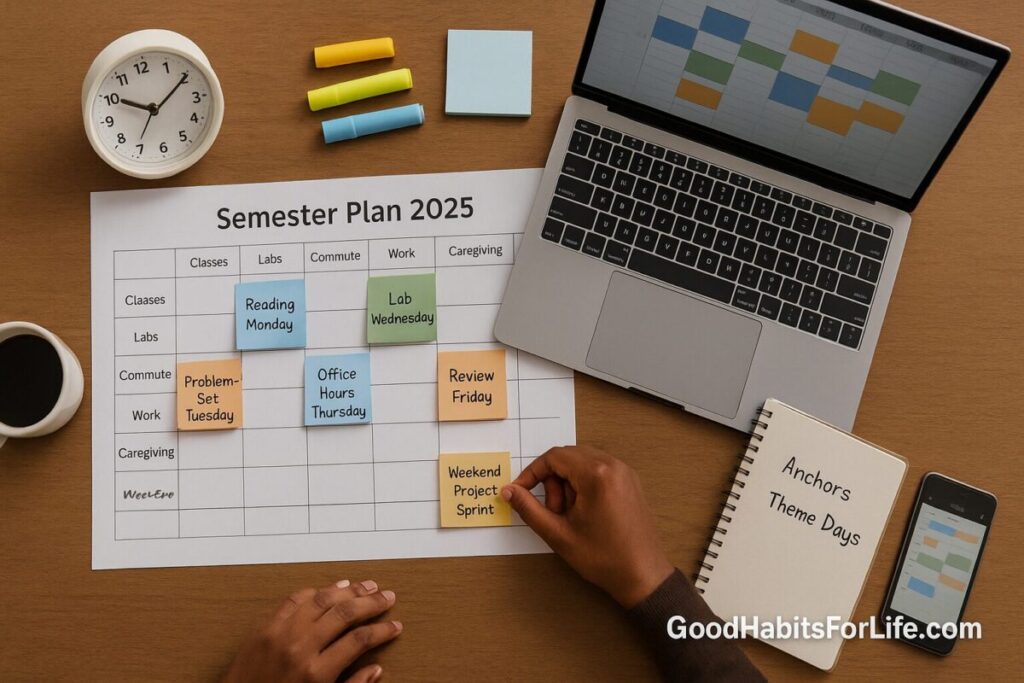
Time Blocking a Semester: Theme Days & Anchors: AI workflows (2025)
Time Blocking a Semester: Theme Days & Anchors (2025)
Table of Contents
🧭 What & Why
Time blocking a semester means designing your entire term on a calendar—starting from fixed anchors (class times, labs, commute, work shifts, caregiving) and then proactively reserving focused blocks for study, review, projects, and admin. Theme days (e.g., Reading Mondays, Problem-Set Tuesdays) group similar tasks to minimize mental reconfiguration (“switching”). This matters because frequent task switching slows performance and increases time loss and stress; focusing on one cognitive mode at a time preserves attention and energy. APA+1
For learning outcomes, blocked study with spaced reviews (1–7+ days apart) outperforms cramming across many domains, from vocabulary to problem solving. Augmenting Cognition+1 Time management training, when applied consistently, is linked to better academic achievement and wellbeing. PMC
Responsible AI workflows now help students turn syllabi into weekly plans, generate practice questions, or create structured checklists—when used ethically and under institutional policy. UNESCO+2Harvard HUIT+2
✅ Quick Start (Do This Today)
-
Collect inputs (30–45 min)
-
Syllabi, exam windows, assignment rubrics, personal commitments.
-
Open your digital calendar (Google, Outlook, Apple).
-
Add anchors first: class meetings, labs, work, commuting, religious/family commitments. (Universities explicitly recommend semester + weekly planners for this step.) lsc.cornell.edu+1
-
-
Pick 2–3 weekday themes (don’t overdo it)
-
Example: Mon: Read/Review, Tue: Problem Sets, Thu: Writing/Projects.
-
Batch admin (email, forms, logistics) into one daily Admin block.
-
-
Place 2 deep-work blocks/day (60–120 min)
-
Morning & early afternoon are prime. Keep 10–15 min buffers between blocks to reset.
-
Avoid mixing dissimilar tasks inside a block (reduces switch costs). APA
-
-
Schedule spaced reviews now
-
For each lecture/topic, drop review events +1 day, +3 days, +7 days. Adjust by course difficulty. ERIC
-
-
Add standing “Office Hours/Peer Study” slots
-
1×/week per tough class; treat as non-negotiable anchors.
-
-
Use AI to draft weekly checklists
-
Prompt idea: “From this syllabus text, list weekly tasks by theme day; add prep steps 48h before quizzes; include reading goals and 10 self-quiz questions per topic.” (Follow school AI rules; verify outputs.) Harvard HUIT+1
-
-
Protect recovery
-
7–8 h sleep windows and movement breaks; schedule them as anchors.
-
-
End-of-week review (20 min Fri)
-
What slipped? Re-block next week accordingly.
-
🗓️ 30-60-90 Habit Plan
Days 1–30: Pilot & stabilize
-
Build your Master Semester Calendar with anchors + first four weeks of deep-work blocks.
-
Test 2 themes (e.g., Reading Mon, Problem Tue) + daily Admin block.
-
Run Pomodoro-style sprints (25/5 or 50/10) inside deep blocks to pace mental effort.
-
Start If-Then cues (implementation intentions): “If it’s 9:00 Mon, then I open the Week 3 reading and annotate 2 sections.” Evidence shows If-Then plans reliably boost goal follow-through. ScienceDirect
Days 31–60: Refine & expand
-
Add a third theme (e.g., Writing Thu), and standing spaced-review windows. ERIC
-
Introduce AI workflows: auto-checklists from syllabi, quiz prompts, rubric-based outlines—document any permitted uses per course. Harvard University+1
-
Trim switching: consolidate small tasks into a single Daily Admin batch. APA
Days 61–90: Lock the template & optimize
-
Finalize a repeatable weekly template.
-
Calibrate block lengths (60, 90, or 120 min) per course demands and cognitive load (hardest first when fresh). med.uvm.edu
-
Add exam-runway blocks (T-14, T-7, T-3 days) that expand review spacing and mixed-practice.
🧠 Techniques & Frameworks
🧩 Theme Days (a.k.a. Day-Theming)
Group similar cognitive tasks on the same day to reduce context switching (e.g., All reading on Mon, problem solving on Tue). This aligns with evidence that switching tasks incurs performance costs; batching limits reconfiguration overhead. APA+1
⛳ Anchors First
Populate fixed commitments before anything else. University learning centers advise mapping a semester calendar and then a weekly plan—your anchors become the rails your blocks run on. lsc.cornell.edu+1
⏱️ Time Boxing vs. Time Blocking vs. Batching
-
Blocking: reserve calendar time for work types.
-
Boxing: set a hard stop to contain perfectionism (great for drafts).
-
Batching: process similar micro-tasks together (email, forms) once or twice daily to cut switching. University of Colorado Denver
🧪 Spaced Practice Windows
Insert reviews days after first learning; spacing boosts long-term retention across topics and settings. Use +1, +3, +7 day defaults, then adjust. Augmenting Cognition+1
🧠 Cognitive Load Management (CLT)
Plan fewer, longer deep blocks for complex tasks, when fresh. Avoid overloading working memory; sequence worked examples → problems; interleave skills progressively. med.uvm.edu+1
🔄 Implementation Intentions (If-Then)
Attach each block to a concrete situational cue (If 2pm Tue, then open PS3, Q1–Q3)—a meta-analysis shows significant gains in goal completion. ScienceDirect
🤖 AI Workflows (2025): Practical & Responsible
What AI can draft (you must verify):
-
Syllabus → plan: extract weekly topics, due dates, prep sequences, and auto-place into theme days.
-
Outline → first draft: rubric-aware outlines, thesis statements, question lists; you do the thinking & writing.
-
Practice → quiz: short-answer, cloze, and problem variations; compare to textbook keys.
Guardrails (follow your institution’s policy):
-
Know the rules. Many universities provide AI use guidance: disclose allowed cases, protect data, and verify outputs. Harvard HUIT+2Harvard University+2
-
Ethics & privacy. UNESCO’s global guidance (updated 2025) emphasizes a human-centred, rights-respecting approach; OECD mapping highlights workload/efficiency gains alongside risks—apply judgment. UNESCO+1
-
Don’t paste sensitive material. Avoid proprietary cases, identifiable data, or restricted assessments.
-
Always cite your sources (texts, lectures), not the AI tool.
Copy-paste prompt starters:
-
“From this syllabus text, build a 12-week study plan with Reading Mon, Problem Tue, Writing Thu. Add +1/+3/+7 day review reminders per topic.”
-
“Generate 10 self-quiz questions from these notes; label each as recall, application, or transfer; suggest errors to watch.”
-
“Create a rubric-based outline for a 1,500-word essay on X; specify paragraph goals and evidence slots; list 6 reputable sources to check.”
👥 Audience Variations
-
Undergraduates: Keep themes simple (max 3). Use shared peer-study anchors (same place/time).
-
Graduate students: Longer deep blocks (90–120 min) for reading/writing; add weekly lit-mapping and data-analysis anchors.
-
Working learners/parents: Compress to 2 deep blocks/day and a weekend long block; protect commute-study anchors (audio review, flashcards).
-
Neurodivergent learners: Prefer predictable routines, visual timers, and shorter cycles (25/5). Keep a “reset script” after interruptions.
⚠️ Mistakes & Myths to Avoid
-
Myth: “More blocks = more done.” Too many small blocks increase switch costs; favor fewer, longer blocks. APA
-
Mistake: Ignoring recovery. Skipping sleep and breaks degrades learning; schedule them as anchors.
-
Myth: “AI can just do my coursework.” Tools can scaffold planning and practice; you remain responsible for integrity and accuracy. Harvard HUIT
-
Mistake: No buffers. Back-to-back blocks collapse under real life; insert 10–15 min reset windows.
-
Mistake: Rigid themes. If a class spikes in difficulty, temporarily shift themes; the calendar serves learning, not vice-versa.
🗣️ Real-Life Examples & Scripts
Weekly Template (sample):
-
Mon—Reading/Review: 09:00–11:00 Deep reading (Course A); 14:00–15:00 Spaced review (+3 day)
-
Tue—Problem Sets: 09:00–11:00 P-set (Course B); 16:00–17:00 TA/peer study
-
Thu—Writing/Projects: 10:00–12:00 Draft lab section; 15:00–16:00 Admin batch
If-Then Scripts:
-
If it’s 8:55 and I’m at the library table, then I open the Week 5 readings and set a 50/10 timer. ScienceDirect
AI-Assist Prompts:
-
“Make a checklist for tomorrow’s ‘Problem-Set Tuesday’: prerequisite readings to skim (10 min), warm-up problems, graded tasks, and a 10-minute reflection.”
Email to instructor about AI use (template):
Subject: Clarifying permitted AI use for [Course X] assignments
Hi Dr. ____, our syllabus references AI tools. For [Assignment Y], may I use an AI assistant to generate practice questions and an outline (not text), with full verification and citation by me? I will not submit AI-generated prose. Thanks!
🧰 Tools, Apps & Resources
-
Calendar: Google Calendar / Outlook / Apple Calendar — universal, shareable, mobile alerts.
-
Time-blocking assistants: Reclaim, Motion, Sunsama — auto-place tasks; log reality vs. plan.
-
Notes / Research: OneNote, Notion, Obsidian — templates for theme days & review logs.
-
Spaced repetition: Anki — custom decks aligned to your +1/+3/+7 schedule. ERIC
-
Focus / blockers: Forest, Freedom, native Focus modes — reduce digital interruptions during deep blocks. Evidence suggests blocking distracting sites can help focus. interruptions.net
📌 Key Takeaways
-
Build your semester from anchors → themes → deep blocks → spaced reviews.
-
Reduce context switching; batch admin once daily. APA
-
Use AI as a planning and practice copilot—not a shortcut—within policy. Harvard HUIT
-
Run a 30-60-90 rollout: pilot, refine, lock the template.
-
Protect sleep, movement, and weekly review—habits that make the system stick.
❓ FAQs
1) How long should a deep-work block be?
Start with 60–90 minutes for heavy reading/writing or problem solving; extend to 120 if you sustain focus without drop-off. Use brief resets to avoid cognitive overload. med.uvm.edu
2) Is Pomodoro (25/5) too short for technical work?
Use 50/10 or 90/15 for complex tasks. The key is pacing and minimizing switches, not the specific ratio. APA
3) How many theme days should I run?
Two or three is plenty. Too many themes recreate the switching you’re trying to avoid. APA
4) How do I space reviews if the course is fast?
Keep +1 day, then compress to +3 and +5 days pre-exam. Spacing—however modest—beats massed practice. ERIC
5) Can AI write my assignment drafts?
Follow your course policy. Many institutions allow AI for brainstorming or outlining but prohibit submitting AI-written text. When allowed, always verify facts and cite sources. registrar.gse.harvard.edu+1
6) Should I time-box everything?
Time-box tasks prone to sprawl (drafting), but keep flexible buffers for labs and group work. Mixed approach works best.
7) What if interruptions are constant (roommates, phone)?
Batch messages into Admin blocks, use focus modes/website blockers, and establish a visible “do-not-disturb” signal during deep blocks. interruptions.net
8) How soon will I notice results?
Most students feel benefit in 2–3 weeks as the routine and spaced reviews accumulate—and stress falls as decisions get automated. PMC
📚 References
-
Aeon, B. et al. (2021). Does time management work? A meta-analysis. (PMC). https://pmc.ncbi.nlm.nih.gov/articles/PMC7799745/ PMC
-
Cornell LSC. Managing Time. https://lsc.cornell.edu/managing-time/ lsc.cornell.edu
-
UNC Learning Center. Using Planners (Calendars & College). https://learningcenter.unc.edu/tips-and-tools/using-planners/ Learning Center
-
Cepeda, N. J., et al. (2006). Distributed Practice… A Meta-Analysis. (PDF). https://augmentingcognition.com/assets/Cepeda2006.pdf Augmenting Cognition
-
Carpenter, S. K., et al. (2012). Using Spacing to Enhance Diverse Forms of Learning. (ERIC PDF). https://files.eric.ed.gov/fulltext/ED536925.pdf ERIC
-
APA. Multitasking: Switching costs. https://www.apa.org/topics/research/multitasking APA
-
Rubinstein, J. S., Meyer, D. E., & Evans, J. E. (2001). Executive Control of Cognitive Processes in Task Switching. (APA PDF). https://www.apa.org/pubs/journals/releases/xhp274763.pdf APA
-
UNESCO (2023, updated 2025). Guidance for Generative AI in Education & Research. https://www.unesco.org/en/articles/guidance-generative-ai-education-and-research UNESCO
-
OECD (2024). Education Policy Outlook 2024. (PDF). https://www.oecd.org/en/publications/education-policy-outlook-2024_dd5140e4-en.html OECD
-
Stanford Teaching Commons (2025). Quick Start Guide to AI & Teaching / Understanding AI Literacy. https://tlhub.stanford.edu/docs/quick-start-guide-to-ai-and-teaching/ ; https://teachingcommons.stanford.edu/teaching-guides/artificial-intelligence-teaching-guide/understanding-ai-literacy TLHub+1
-
Harvard University IT. Generative AI Guidelines. https://www.huit.harvard.edu/ai/guidelines Harvard HUIT
-
UC Denver (2025). Struggling with Time Management? Try Time Blocking! https://www.ucdenver.edu/student/stories/library/lynx-tales/struggling-with-time-management-try-time-blocking University of Colorado Denver