
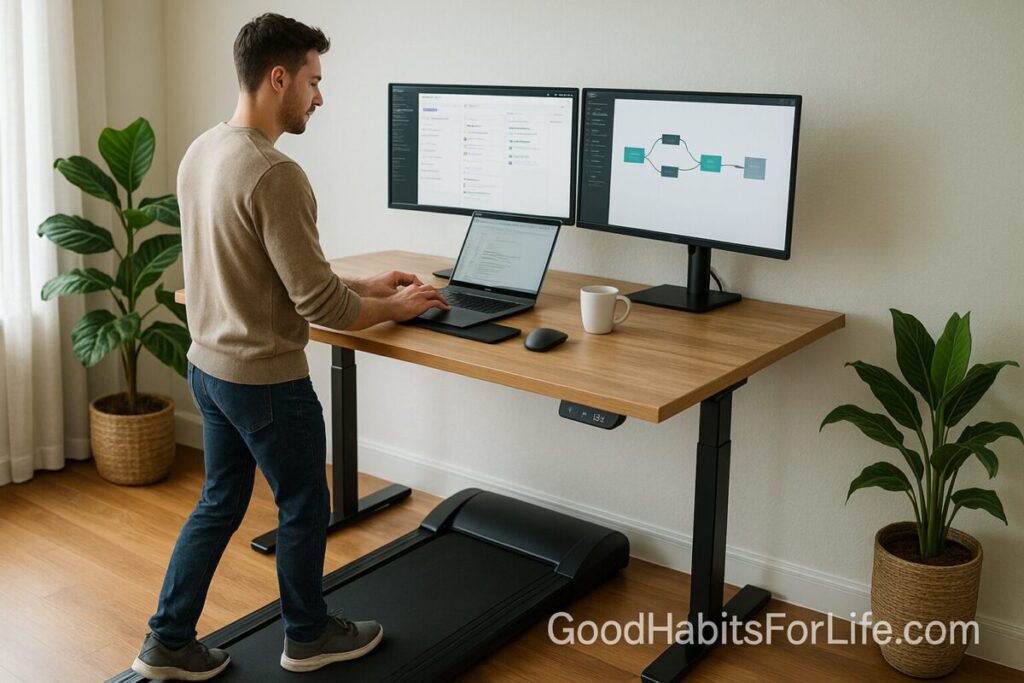
Treadmill Desk 101: Setup & Habits: AI workflows (2025)
Treadmill Desk 101: Setup, Habits & AI Workflows (2025)
Table of Contents
🧭 What is a Treadmill Desk & Why It Helps
A treadmill desk pairs a height-adjustable desk with a slow-walking base so you can alternate between sitting, standing, and walking while working. It’s not a workout replacement; it’s a NEAT (non-exercise activity thermogenesis) booster that breaks up long sitting spells.
Evidence-backed benefits
-
More energy burned vs. sitting: Slow walking at ~1–2 mph (1.5–3.0 km/h) can raise energy expenditure 2–3× over sitting, meaning hundreds of extra kilocalories per day depending on duration and body mass (see NEAT and workstation studies in References).
-
Less prolonged sitting: Reducing uninterrupted sitting is linked with lower cardiometabolic risk markers and better overall health behaviors.
-
Comfort & musculoskeletal relief: Alternating postures (sit/stand/walk) can ease stiffness and back discomfort for many users.
-
Cognition & performance: For most “light-cognitive” tasks, slow walking has negligible impact after a short adaptation period; for deep or fine-motor tasks, pause walking.
Bottom line: Use it to break up sitting and add light movement to your day without sacrificing core output.
✅ Quick Start: Today’s 20-Minute Setup
-
Zone your tasks (2 min). Mark tasks safe for walking: admin, inbox triage, reading, brainstorming, 1:1 calls, stand-ups.
-
Set the base speed (1 min). Begin at 1.5–2.0 km/h (1–1.2 mph). You should talk comfortably and type passably.
-
Desk & monitor (5 min).
-
Elbows near 90° with shoulders relaxed.
-
Wrists neutral; keyboard/mouse close.
-
Screen top 2–5 cm below eye level; distance about an arm’s length.
-
-
Footwear (1 min). Supportive walking shoes; use an anti-fatigue mat when standing.
-
Timer (1 min). Set 15 minutes of walking, then 5 minutes standing or sitting.
-
AI assist (5 min). Turn on voice typing/dictation for notes and drafts (see “AI Workflows”).
-
Check noise/camera (5 min). Test mic; use push-to-talk on calls. Position camera on a stable arm (no wobble).
🧠 7-Day Starter Plan
Goal: Learn the rhythm, not the mileage.
-
Day 1–2: 3 × 10 min walking blocks (total 30 min). Focus on low-stakes tasks and reading.
-
Day 3–4: 3 × 15 min (45 min). Add voice notes or dictation.
-
Day 5: 2 × 20 min + 1 × 15 min (55 min). Try one short call while walking.
-
Day 6: 3 × 20 min (60 min). Introduce a 5-min mobility break after each block.
-
Day 7 (Review): What tasks paired best? Adjust speed (max 3.0 km/h | 2 mph for most) and screen height.
Checkpoint: No soreness beyond light calf/foot fatigue; typing accuracy stable; focus intact for chosen tasks.
🛠️ 30-60-90 Roadmap (Habit Progression)
Days 1–30 – Establish (2–4 hrs/week)
-
Walk 60–90 min/day in short bouts (10–20 min).
-
Keep speed 1.5–2.5 km/h; prioritize admin, reading, and brainstorming.
-
Track time, not steps. Note best “walking tasks.”
Days 31–60 – Expand (4–6 hrs/week)
-
Build to 90–120 min/day across 3–5 blocks.
-
Introduce “Walk-mo(doro)”: 25 min walk + 5 min sit/stand.
-
Add AI drafting for blog posts, briefs, and meeting summaries.
-
Refine ergonomics: monitor riser, external keyboard/mouse, cable management.
Days 61–90 – Optimize (6–8 hrs/week)
-
Maintain 90–150 min/day as default for light tasks.
-
Split day into posture zones:
-
Morning: Walk for inbox, reading, quick syncs.
-
Midday: Sit/stand deep work (turn off belt).
-
Afternoon: Walk for reviews and planning.
-
-
Add “meeting moves”: walk for 1:1s and stand for large presentations.
🧩 Techniques & Frameworks for Focus
-
Task-Posture Matching:
-
Walk: reading, email triage, idea capture, Kanban grooming, low-stakes edits, async voice memos, daily planning.
-
Stand: workshops, facilitation, whiteboarding on tablet, light design tweaks.
-
Sit: deep writing, data modeling, pixel-perfect design, video editing.
-
-
Walk-mo(doro): 25′ walk + 5′ stand/sit. Repeat ×3, then a longer sit.
-
Friction-free start: Shoes under desk, belt start/stop mapped to a keyboard macro, “walking playlist” at low volume.
-
Focus Guardrails:
-
Speed ≤ 3.0 km/h (2 mph) for typing.
-
Mute self on large calls; use noise-cancelling mic.
-
Turn off belt for live presentations/demos.
-
🤖 AI Workflows While Walking
Dictation & Drafting
-
Use voice typing (Google Docs/Word/Notion) or OS dictation to capture thoughts while walking.
-
Prompt your AI assistant with short structured inputs:
Prompts you can paste while moving
-
“Summarize these notes into 5 bullets with next actions: [paste voice notes].”
-
“Draft a 120-word email to [stakeholder] proposing [X]. Tone: friendly, concise.”
-
“Turn these bullets into an outline with H2/H3 for a blog post on [topic].”
-
“Create a meeting brief: agenda, decision points, and risks from: [notes/link].”
Meeting & Research Support
-
Auto-transcribe meetings (e.g., native recording/transcription tools). Walk while bookmarking timestamps for action items.
-
Ask AI to extract tasks, owners, and deadlines from transcripts.
Editing on the Move
-
Command AI to tighten prose, create TL;DR, or convert notes into checklists.
-
Use a text expander for repeated phrases so typing while walking stays minimal.
📐 Ergonomics & Setup Essentials
-
Desk Height: Adjust so forearms are parallel to the floor; elbows around 90°; shoulders relaxed.
-
Monitor: Top of screen roughly 2–5 cm below eye level; about an arm’s length away. Consider an anti-glare screen.
-
Keyboard & Mouse: Keep wrists neutral; consider a slight negative tilt tray; use a vertical mouse if wrist strain appears.
-
Speed & Stride: Shorten your stride at 1.5–3.0 km/h (1–2 mph); this stabilizes torso for typing.
-
Noise & Vibration: Look for quiet bases (<~60 dB). Place a vibration-damping mat if floors are hollow.
-
Footwear: Cushioned walking shoes; rotate pairs if walking >60 min/day.
-
Safety: Keep the deck clear; auto-stop tether if available. Step off before adjusting cables or moving the monitor.
🧑🤝🧑 Audience Variations
-
Students: Walk for readings, flashcards, and brainstorming; sit for problem sets. Use dictation to draft outlines before turning them into essays.
-
Professionals: Pair walking with inbox triage, stand-ups, retros, and async reviews. For deep work (financial models, code), switch to sit/stand.
-
Parents/Caregivers: Use short bouts between school runs; voice-capture to-dos and meal plans.
-
Seniors: Start slower (1.2–1.8 km/h), shorter bouts (5–10 min), and use wider handrails. Consult a clinician if you have balance, cardiac, or joint concerns.
⚠️ Mistakes & Myths to Avoid
-
Myth: “If I have a treadmill desk, I don’t need workouts.”
Reality: It boosts NEAT and breaks up sitting; you still need moderate-to-vigorous activity weekly (see guidelines). -
Mistake: Walking too fast.
Fix: Keep ≤ 3.0 km/h (2 mph) for office tasks. -
Mistake: One posture all day.
Fix: Alternate walk/stand/sit. -
Mistake: Poor monitor height and reach.
Fix: Raise screen, bring inputs close, relax shoulders. -
Myth: “Typing accuracy always drops.”
Reality: After an adaptation period, most people maintain everyday productivity for light tasks; pause walking for precision work.
🗣️ Real-Life Examples & Scripts
-
Slack/Teams status: “Walking desk—on mic if needed. Expect 1–2 min response delay.”
-
Meeting opener: “I’m on a walking desk—if audio quality dips I’ll pause the belt.”
-
Internal norm: “1:1s and stand-ups = walking-optional. Presentations = belt off.”
-
Personal rule: “If the task requires pixel-precision or heavy number entry, I sit/stand.”
🧰 Tools, Apps & Resources
Hardware criteria (not brands):
-
Belt length ≥ 120 cm for comfortable stride; speed range up to 3–6 km/h is plenty.
-
Low noise, remote control, safety tether, and manual speed buttons.
-
A stable, height-adjustable desk (memory presets help).
-
Cable management and monitor arms to reduce wobble.
Apps & utilities
-
Timers: native Focus sessions or Pomodoro apps.
-
Posture reminders: simple hourly notifications.
-
Dictation: OS dictation, voice typing in Docs/Word, or mobile recorder synced to notes.
-
Text expanders & macros: speed common phrases and start/stop controls.
-
AI assistants: drafting, summarizing, checklists, task extraction from transcripts.
Pros & Cons
-
Pros: less sitting, higher incidental movement, creative momentum.
-
Cons: adaptation time, potential foot/leg fatigue, camera wobble if the desk isn’t rigid.
🧾 Key Takeaways
-
Keep walking slow and tasks light; sit/stand for precision and deep work.
-
Nail ergonomics first; discomfort is a setup problem, not a treadmill destiny.
-
Build gradually with short bouts; aim for 60–120 min/day of walking blocks.
-
Leverage AI to capture, draft, and summarize so movement doesn’t hinder output.
-
Treat it as a sedentary-break tool, not a workout replacement.
❓ FAQs
1) What speed should I use?
Most users do well at 1.5–3.0 km/h (1–2 mph). If typing accuracy drops or you feel jostled on camera, slow down.
2) How much should I walk each day?
Start with 30–60 minutes total in short bouts and build toward 90–150 minutes across the workday, as schedule allows.
3) Will I lose weight with a treadmill desk?
It can raise daily energy expenditure but results vary. Consider it an incidental movement boost; keep workouts and nutrition on track.
4) Is it noisy for calls?
Modern bases can be quiet; use a noise-cancelling mic and push-to-talk. For large presentations, pause the belt.
5) What about joint or back pain?
If pain appears, re-check ergonomics (screen height, elbow angle, shoe choice) and reduce duration/speed. Consult a clinician if it persists or if you have medical conditions.
6) Can I run on it?
Running and office tasks don’t mix. Use slow walking for work; save running for dedicated workouts.
7) Do I need special shoes?
Supportive walking shoes are ideal. Avoid minimalist or worn-out soles for long desk walks.
8) Will it hurt my typing speed?
Expect a short adaptation phase. For precision tasks, sit/stand. For everyday email/reading, most people adjust fine.
9) Are there alternatives?
Yes—sit-stand desks, under-desk cycles, movement breaks, and “walk-and-talk” phone calls all reduce sedentary time.
10) How do I prevent camera shake?
Use a rigid desk, a solid monitor/phone arm, and walk slowly. If needed, pause the belt when presenting.
📚 References
-
U.S. Department of Health and Human Services. Physical Activity Guidelines for Americans, 2nd ed. https://health.gov
-
CDC. “How Much Physical Activity Do Adults Need?” https://www.cdc.gov/physicalactivity/basics/adults/
-
WHO. Guidelines on Physical Activity and Sedentary Behaviour (2020). https://www.who.int/publications
-
Mayo Clinic. “What are the risks of sitting too much?” https://www.mayoclinic.org/healthy-lifestyle/adult-health/expert-answers/sitting/faq-20058005
-
NIOSH/CDC. “Sedentary Work—Moving to a Healthier Workplace.” https://blogs.cdc.gov/niosh-science-blog/
-
Levine JA. “Non-exercise activity thermogenesis (NEAT).” Best Practice & Research Clinical Endocrinology & Metabolism (2002, 2007).
-
Shrestha N, et al. “Workplace interventions for reducing sitting at work.” Cochrane Database of Systematic Reviews (2018).
-
Straker L, et al. “A comparison of typing performance, comfort and posture while sitting, standing or walking.” Ergonomics (2012).
-
Torbeyns T, et al. “Active workstations to fight sedentary behaviour.” Sports Medicine (2014).
-
John D, et al. “Effect of treadmill workstations on energy expenditure and cardiometabolic health.” Journal of Physical Activity & Health (various studies).
Disclaimer: This article provides general fitness and ergonomics information and is not a substitute for professional medical advice.