
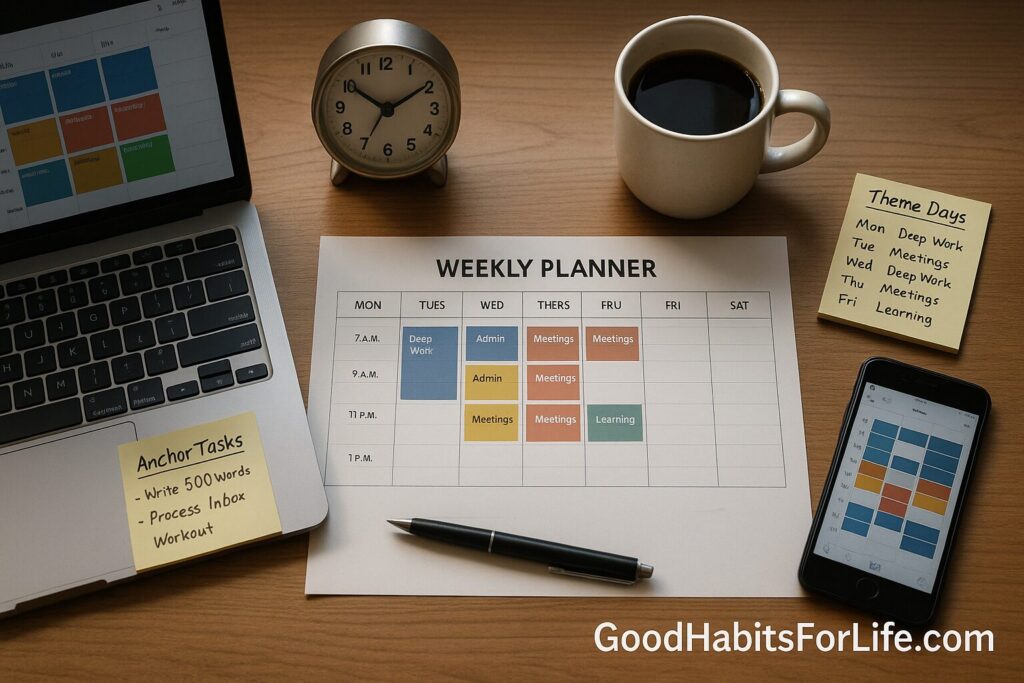
Time Blocking 2025: Theme Days + Anchor Tasks
Time Blocking 2025: Theme Days + Anchor Tasks
Table of Contents
🧭 What & Why
Time blocking means planning your day as a series of dedicated blocks for specific tasks or task types (e.g., writing, analysis, admin), rather than living from an open to-do list. It increases focus, gives your day structure, and reduces decision fatigue. Universities now teach it as a core time-management strategy. Penn LPS Online
Why it works:
-
Less context switching. Even brief mental shifts between tasks can cost a large share of productive time; APA summarizes research showing switching can sap up to ~40% of productivity. Protecting single-task blocks limits these losses. APA
-
Attention residue. After you stop Task A, part of your attention lingers, hurting performance on Task B. Blocks let you finish or “park” tasks properly to reduce residue. ScienceDirect
-
Realistic planning. Blocks help counter the planning fallacy (we underestimate how long work takes) by forcing time estimates onto the calendar. Massachusetts Institute of Technology
-
Fewer reactive decisions. Theme days and batching reduce ad-hoc choices and interruptions that fragment work. Research on interruptions shows they increase speed at a cost of stress and errors — structure helps tame that. UCI Bren School of ICS
✅ Quick Start: Do This Today
-
Pick your anchor tasks (1–3).
-
Ask: “Which 1–3 outcomes today would make everything else easier?” Make these non-negotiable.
-
-
Create 4 block types in your calendar:
-
Deep Work (60–120 min): complex, brain-heavy tasks.
-
Admin (30–60 min): email, approvals, routine updates.
-
Meetings (as needed): preferably back-to-back.
-
Recovery/Buffer (15–30 min): transitions, notes, stretch.
-
-
Schedule anchor tasks first. Put them in your prime-energy window (e.g., morning).
-
Batch the rest. Group similar tasks together (email, reporting, calls). Batching minimizes switching and keeps momentum. graduateschool.syr.edu
-
Add buffers + realistic capacity. Plan only 70–80% of your working hours; keep 15–30 min between blocks to reset and prevent spillover (Parkinson’s Law loves empty space). The Economist
-
Communicate boundaries. Auto-reply or status message: “Heads-down 10:00–12:00 — I’ll respond after.” (Templates below.)
-
Close the loop daily. At day’s end, roll unfinished items forward, estimate time, and place them into blocks for tomorrow.
🗺️ 30-60-90 Day Habit Plan
Goal: 3–4 hrs/day of deep work, consistent anchors, lower stress.
Days 1–30 (Foundations)
-
Weekly planning ritual (30–45 min): pick weekly theme(s), define 3–5 outcomes, pre-block calendar.
-
Daily preview (10 min): confirm anchors, fine-tune blocks.
-
Metrics to track:
-
Deep-work hours (target 10–15/week)
-
Schedule adherence (≥70%)
-
Interruptions/day (aim ↓ week by week)
-
-
Checkpoint: Are anchor blocks protected? Reduce meetings that sit on top of them.
Days 31–60 (Refine & Expand)
-
Introduce theme days (e.g., Mon=Strategy, Tue=Creation, Wed=Collaboration, Thu=Client, Fri=Admin/Review). This further cuts switching and decision fatigue. WIRED
-
Start time-boxing for slippery tasks (give them hard edges).
-
Add closing ritual (10 min): note wins, park tasks, set tomorrow’s first anchor.
Days 61–90 (Optimize)
-
Calibrate durations (double anything that routinely overruns — planning fallacy workaround). Massachusetts Institute of Technology
-
Advance batching: one inbox block AM + one PM; one call block daily.
-
Quarterly review: update themes, prune recurring meetings, align anchors to goals.
🛠️ Techniques & Frameworks
🧱 Time Blocking vs Boxing
-
Blocking: reserve types of work in larger chunks (e.g., writing block).
-
Boxing: assign a fixed time limit to a specific task (e.g., “Draft report — 60 min”). Use boxing when Parkinson’s Law threatens to expand a task. The Economist
🧺 Task Batching (Admin, calls, approvals)
Batch similar tasks in one block to reduce cognitive switching and ramp-up costs. University guides recommend it to “greatly increase productivity” for focused periods. graduateschool.syr.edu
🎨 Theme Days (Mon = Strategy, Tue = Creation…)
A weekly pattern that groups similar work by day. It boosts focus and predictability and supports deep work by minimizing ad-hoc decision making. WIRED
🎯 Anchor Tasks (Your daily non-negotiables)
Choose 1–3 high-impact tasks tied to goals. Place them in your best energy window; treat them like external appointments.
🧭 Prioritization with the Eisenhower Matrix
Use it weekly to select anchor tasks: Important/Not Urgent items belong in deep-work blocks before they turn urgent. PMC
⏳ Pomodoro+ (for resistance)
For tasks you resist, use 25/5 or 50/10 focus cycles inside a block, then expand to longer cycles as stamina improves.
👥 Audience Variations
Students
-
Theme days by subject; batch readings/notes; schedule labs/problem sets in long morning blocks. Use a Sunday planning ritual and an Eisenhower sheet weekly. PMC
Professionals/Managers
-
Put 2×90-min anchor blocks on meeting-light days; move 1:1s and status updates into Collaboration afternoons; create “no-meeting mornings” twice/week.
Creators/Freelancers
-
Theme days (Pitching, Production, Editing, Admin). Use boxing to prevent over-polishing; track deep hours as your main KPI.
Parents/Caregivers
-
Block around fixed school/nap times; pre-decide “micro-anchors” (30–45 min) and keep setup lists ready to start fast.
Seniors/Adults returning to learning
-
Use shorter blocks (30–45 min) with longer buffer breaks; schedule admin and errands as batches to protect cognitive energy.
⚠️ Mistakes & Myths to Avoid
-
Myth: “Blocking is too rigid.” Reality: it’s a draft. You’ll reflow blocks daily.
-
Overfilling the calendar. Aim for 70–80% capacity; leave buffers.
-
Ignoring attention residue. Always “park” work with a quick note: next step + where to resume. ScienceDirect
-
Letting meetings colonize anchors. Protect anchor blocks as if they were client meetings.
-
No weekly review. Without a reset, blocks drift toward urgent-only work.
💬 Real-Life Examples & Scripts
Batching email (status):
“Focused work 10:00–12:00. Checking email at 12:15 and 16:30. If urgent, call.”
Defending a deep-work block (Slack/Teams):
“Heads-down on Q3 analysis 10:00–11:30. If you need me, I’ll emerge at 11:30 and can hop on a quick call then.”
Meeting-free time request (to manager):
“To ship the dashboard by Friday, I’ve blocked Tue 9:30–11:30 and Thu 10:00–12:00 for deep work. Can we keep these two windows meeting-free?”
Theme-day weekly note (to team):
“Wed = Collaboration Day: reviews, 1:1s, and stakeholder syncs. Please funnel requests there so Mon/Tue stay for creation.”
🧰 Tools, Apps & Resources (quick picks)
-
Google Calendar / Microsoft Outlook — native, sharable, reliable; color-code blocks; add buffer automations.
-
Sunsama / Motion / Akiflow — plan tasks into calendar with auto-scheduling; great for batching & theme days; steeper learning curve.
-
Notion / Obsidian — pair with a calendar; capture anchor tasks, templates, and reviews.
-
Toggl Track / RescueTime — measure deep-work hours and interruptions.
-
Pomofocus / Focus To-Do — easy timers for resistance tasks.
📌 Key Takeaways
-
Plan the shape of your day (blocks) before filling tasks; schedule anchors first.
-
Use theme days and batching to cut context switching and attention residue. ScienceDirect
-
Keep 20–30% slack in your schedule; add buffers to beat Parkinson’s Law. The Economist
-
Review weekly; track deep-work hours, adherence %, and interruptions/day.
-
Communicate your focus windows so others protect them too.
❓ FAQs
1) How long should a deep-work block be?
60–120 minutes works for most knowledge work; start at 60 and stretch to 90–120 as stamina improves.
2) What if my day is meeting-heavy?
Cluster meetings (batch them), then protect one daily 60–90-min anchor block at the day’s edge (early AM/late PM).
3) Is time boxing different from time blocking?
Yes. Blocking reserves categories of work; boxing sets a fixed time limit for a specific task. Use both to prevent tasks from expanding. The Economist
4) How do theme days help?
They reduce decision fatigue and context switching by grouping similar work; many teams adopt block scheduling variants for this reason. WIRED
5) I always underestimate task durations — how do I fix it?
Use a “double-if-uncertain” rule and log actual durations. The planning fallacy shows we’re systematically optimistic; calibrate using real data. Massachusetts Institute of Technology
6) How do I stop email/IM from breaking blocks?
Set two inbox blocks/day, use status messages, and create filter rules. Batching routine comms reduces switching costs. graduateschool.syr.edu
7) What if urgent requests appear?
Hold a daily buffer block. If truly urgent, swap it with a scheduled block and reschedule that block immediately — don’t drop it.
8) Can time blocking reduce stress?
Yes — structure reduces interruptions and reactive decision-making, which are linked to stress and lower performance. UCI Bren School of ICS
📚 References
-
University of Pennsylvania LPS Online — Mastering Your Schedule: Time Blocking. Penn LPS Online
-
American Psychological Association — Multitasking: Switching costs. APA
-
Gloria Mark (UC Irvine). The Cost of Interrupted Work: More Speed and Stress. CHI 2008. UCI Bren School of ICSACM Digital Library
-
Sophie Leroy. Why is it so hard to do my work? The challenge of attention residue when switching between work tasks. OBHDP (2009). ScienceDirectIDEAS/RePEc
-
Buehler, Griffin & Ross. Exploring the Planning Fallacy: Why People Underestimate Their Task Completion Times. JPSP (1994). Massachusetts Institute of Technology
-
National Library of Medicine (PMC). The Illusion of Urgency. (Eisenhower Matrix context). PMC
-
Syracuse University Graduate School — Task Batching and Time Chunking. graduateschool.syr.edu
-
Parkinson’s Law. The Economist (1955). The Economist
-
WIRED — How to Use Block Scheduling to Revamp Your Workflow. WIRED
(No medical/financial/legal advice.)