
OBD & Live Data: Whats Useful for Everyday Drivers: Dopamine Detox (2025)
OBD & Live Data: What’s Useful for Everyday Drivers (2025)
Table of Contents
🧭 What This Guide Covers & Why It Matters
OBD (On-Board Diagnostics) is the standardized system your car uses to monitor emissions-related components and record Diagnostic Trouble Codes (DTCs) when something’s off. Since the late 1990s, OBD-II has been required in most light-duty vehicles; it stores fault codes, turns on the “check engine” light, and provides live data (PIDs) that apps and scan tools can read. Regulators emphasize that OBD monitors nearly every emissions-relevant component and alerts drivers so problems can be found and fixed accurately (CARB/EPA).
For everyday drivers, decoding a warning light or spotting an overheating trend before it strands you is the real win. Used safely, in-car feedback can also nudge better fuel economy—studies summarized by fueleconomy.gov show ~3% average gains (up to ~10% when drivers actively try) without expensive hardware changes.
Finally, modern cars are rolling smartphones. Distraction kills: in 2023, 3,275 people died in crashes involving distracted drivers in the U.S. (NHTSA). A simple “driving focus” routine—our practical take on a “dopamine detox”—helps you limit tempting inputs and keep attention on the road.
✅ Quick Start: Your 20-Minute Setup
Goal: Be ready to read codes, check a few live signals when parked, and drive with fewer distractions.
-
Get a basic OBD-II reader (Bluetooth) + a reputable app.
-
Look for adapters with automatic sleep (to avoid battery drain) and app support for your phone OS.
-
Install an app such as a general OBD reader that shows codes, freeze frame, readiness monitors, and a short list of live PIDs. (Brand choice is up to you.)
-
-
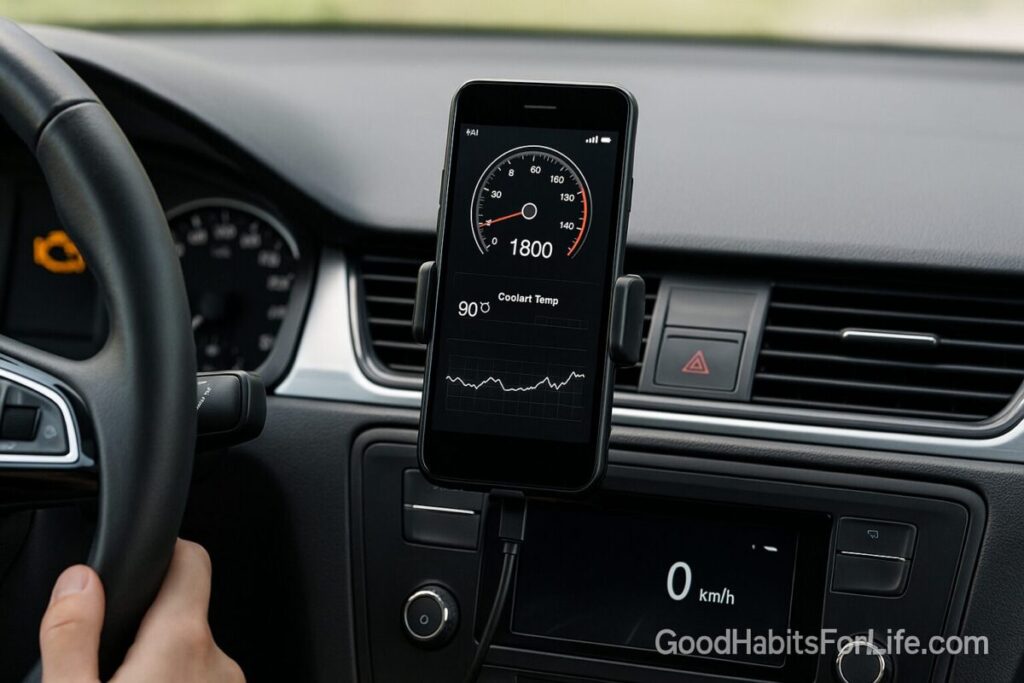
Mount your phone legally and safely.
-
Windshield/vent mount; route cable cleanly. Never stare at gauges while the car is moving—set up views while parked.
-
-
Pair, connect, and read stored codes (parked, engine off or on as the app requires).
-
Save a snapshot (codes + freeze frame). Clear codes only after documenting them and fixing causes.
-
-
Create a “Short Check” dashboard (parked).
-
Add: Coolant temp, Battery/charging voltage, Fuel trims (LTFT/STFT), Transmission temp (if available), and Misfire/Mode $06 if your app exposes it.
-
-
Enable your “dopamine detox” driving mode.
-
Turn on OS Do Not Disturb While Driving, allow only critical calls (family, emergency), auto-reply to texts, and lock infotainment to navigation + music only. (NHTSA/CDC back the principle: phone away while driving.)
-
🛠️ The 5 OBD Live Signals Worth Learning (When Parked)
These are practical when you’re diagnosing, waiting in the driveway, or pulled over safely. Don’t live-watch gauges on the move.
-
Diagnostic Trouble Codes (DTCs) + Freeze Frame
-
Start here. Codes plus the saved snapshot (RPM, load, temp at failure) guide next steps or a conversation with your mechanic. OBD is designed to store exactly this information.
-
-
Coolant Temperature
-
Helpful for checking warm-up, cooling-fan operation, and avoiding overheating after a long climb or traffic crawl.
-
-
Battery/Charging Voltage
-
A quick health pulse for the 12-V system. Odd readings while accessories run can hint at a weak battery or charging issue (check with a proper tester later).
-
-
Fuel Trims (Short-Term/Long-Term)
-
A simple way to see whether the engine computer is adding or subtracting fuel to hit target mixture—useful when tracking vacuum leaks or MAF issues after an air-filter or hose change. (Advanced users only; trends matter more than single numbers.)
-
-
Transmission Temperature (if supported)
-
Useful on hot days, towing, or long grades. If temps climb unusually, it may be time for service or a cooler check.
-
Pro move: After repairs or battery disconnects, check readiness monitors before inspection—monitors must complete to pass many emissions tests (EPA/IM programs).
🧠 A Safer “Dopamine Detox” for Daily Driving
“Dopamine detox” is pop shorthand for reducing high-stimulation inputs. In the car, the evidence-backed version is simple: remove phone/infotainment distractions that steal attention from the road. In 2023, distraction contributed to thousands of U.S. deaths and hundreds of thousands of injuries (NHTSA).
Your in-car detox checklist (2 minutes):
-
Enable Do Not Disturb While Driving (auto-activate by motion/Bluetooth).
-
Hide badges and lock screens; disable social/audio autoplay.
-
Pin essentials only: navigation, calls (hands-free), audio.
-
Set an auto-reply: “I’m driving—will reply soon.”
-
Mount the phone where legal; eyes on road, not on gauges.
-
For passengers: designate a “co-pilot” to handle maps and messages.
Why this works: Reducing cognitive load and temptation aligns with safety guidance from NHTSA and public-health agencies. Less switching = more attention for hazards.
🗓️ 30-60-90 Day Habit Plan
Day 0–7 (Setup & Safety)
-
Install reader + app, create your Short Check dashboard (parked).
-
Enable DND-While-Driving and set auto-replies.
-
Practice a pre-drive routine: start, wait 15–30 seconds, scan for warning lights, then go.
Day 8–30 (Basics & Logs)
-
If a light appears, log codes + freeze frame before any reset.
-
Capture 3–5 “baseline” snapshots on calm days (coolant warm-up time, trims at idle, voltage with/without accessories).
-
Eco-driving basics 2x/week commute: steady acceleration, early lift-off, and smoother spacing—shown to improve economy when paired with feedback (fueleconomy.gov).
Day 31–60 (Confident Troubleshooting)
-
Learn what “normal” looks like for your car. Use live data (parked) to double-check simple fixes (loose gas cap after an evap code, clogged cabin filter affecting blower load).
-
Keep distraction-free driving automatic: if you touch the phone in motion, tighten the settings (e.g., harsher DND rules).
Day 61–90 (Optimize & Review)
-
If you DIY, add Mode $06 (misfire counts) to your parked checks before/after tune-ups.
-
Review fuel logs; aim for a 3–10% improvement with feedback-aided eco-driving (safely applied).
-
Create a one-page car health cheat sheet (codes seen, dates, fluids changed).
🧩 Techniques & Frameworks
1) Troubleshoot in Three Steps (P–D–R)
-
Pull codes + freeze frame (parked).
-
Detect patterns with a few PIDs (coolant, trims, voltage, trans temp).
-
Resolve root causes or escalate to a pro with your snapshots—techs appreciate quality data.
2) Eco-Driving Without Distraction
-
Sensible driving (gentle accel/brake, observing speed) saves fuel; feedback devices improve economy on average ~3% and up to ~10% for engaged drivers (fueleconomy.gov).
-
Important: Feedback isn’t a game while moving—don’t chase numbers on live screens. NHTSA warns that over-focusing on efficiency displays can trade off with safety.
3) Readiness Before Inspection
-
After a battery change or code clear, drive varied routes to let monitors set (cold start, cruise, stop-and-go). Many states rely on OBD readiness for inspections (EPA).
👥 Audience Tips
Parents
-
Use co-pilot rule: teen handles navigation; parent drives.
-
Model the detox: phone in glove box; auto-reply on. Share NHTSA stats to build the “why.”
Students & New Drivers
-
Start with codes + coolant + voltage only. Add trims later.
-
Keep a small “what the light means” card in the visor.
Busy Professionals
-
Pre-set meeting auto-reply and VIP-only calls while driving.
-
Scan codes before service; attach screenshots to your work ticket.
Seniors
-
Use bigger text and voice commands.
-
Avoid heavy multitasking—limit screens to nav/map only.
⚠️ Mistakes & Myths to Avoid
-
Myth: “I should watch every gauge while I drive.”
Reality: That’s distraction. Set up while parked; glance only at the stock cluster in motion (speed, fuel, warning lights). (NHTSA/CDC) -
Mistake: Clearing codes immediately.
Always save codes + freeze frame first; you’ll need them if the issue returns (OBD design). -
Myth: “OBD tells you exactly which part to swap.”
Codes point to systems/sensors, not guaranteed failed parts. Test before buying. -
Mistake: Chasing mpg with risky behavior.
Hyper-tailgating or rolling stops are dangerous and flagged in safety research. -
Mistake: Looking at trims without context.
Single snapshots mislead; compare to your baseline and symptoms.
💬 Real-Life Scripts & Examples
At the shop (after a check-engine light):
“Here are the stored codes and freeze-frame screenshots, plus my notes on coolant temp and fuel trims at idle. Could you confirm the diagnosis before we replace parts?”
Passenger/co-pilot script:
“I’ve set DND-While-Driving. Can you handle texts and pin quiet music? If we need to change the route, please do it.”
Teen driver coaching:
“We keep the phone on DND and mount it only for maps. If a message arrives, the auto-reply handles it. Your only job is the road.”
OBD example, evap code after refuel:
-
You see a small-leak evap code. First check: gas cap seated and seal clean; clear code, drive a few cycles, and re-check readiness monitors (EPA guidance on OBD IM programs).
🧰 Tools, Apps & Resources (Pros/Cons)
-
Bluetooth OBD-II adapter
-
Pros: cheap, portable, works with many apps.
-
Cons: quality varies; choose units with auto-sleep and encryption.
-
-
OBD apps (general-purpose)
-
Pros: decode codes, show freeze frame, readiness, basic PIDs.
-
Cons: advanced features (Mode $06, bi-directional tests) may require paid tiers.
-
-
Phone Focus/Driving modes (iOS/Android)
-
Pros: reduce distraction by silencing notifications, auto-replies.
-
Cons: requires initial setup; whitelist emergency contacts. (NHTSA/CDC recommend phone-away behavior.)
-
-
Fuel-economy feedback (built-in or app)
-
Pros: helps develop smoother habits; 3–10% typical gains when used safely (fueleconomy.gov).
-
Cons: over-focusing on displays can distract—configure once, then ignore while moving.
-
🧾 Key Takeaways
-
Start simple: Codes + a few PIDs answer 80% of everyday questions.
-
Safety first: Set dashboards when parked; eyes up while moving.
-
Dopamine detox ≠ gimmick: It’s a practical, low-stim setup that reduces attention theft.
-
Prove and improve: Baselines + occasional snapshots make patterns obvious.
-
Eco-wins: Feedback, smoother driving, and fewer roof loads can materially save fuel (fueleconomy.gov).
❓ FAQs
1) Is reading codes legal and safe for warranty?
Yes—reading codes is like reading a thermometer. Don’t clear codes just to hide them; document, fix, and let monitors reset (EPA/IM programs).
2) Can I watch live data while driving?
Don’t. Configure views while parked. Focus on the road; distraction is a known crash risk (NHTSA/CDC).
3) Do fuel-economy displays really help?
Used responsibly, feedback is associated with ~3–10% improvements on average (fueleconomy.gov). Results vary by driver and route.
4) Will an OBD reader drain my battery?
Quality adapters sleep when the car is off. If yours doesn’t, unplug it when you park for days.
5) What about EVs?
Many EVs still report data via OBD or brand-specific ports; coverage varies. Check your model’s community/app ecosystem.
6) What are “readiness monitors”?
Self-tests the car runs after start/drive cycles; they must complete before many inspections will pass (EPA).
7) I cleared a code and it came back. Now what?
Grab the new freeze frame, note patterns in trims/temps/voltage, and see a pro with your documentation.
8) Can OBD tell me exactly which part to replace?
No—codes point to circuits/systems. Use them to guide testing, not to jump straight to parts.
9) Is “dopamine detox” a medical protocol?
No—it’s a nickname here for a low-distraction driving setup, consistent with safety guidance to minimize phone/infotainment use on the move (NHTSA/CDC).
10) Will roof boxes really hurt mpg?
Yes—drag matters; fueleconomy.gov shows sizable penalties, especially at highway speeds. Remove carriers when not needed.
📚 References
-
California Air Resources Board. On-Board Diagnostic (OBD) Program – About OBD. https://ww2.arb.ca.gov/our-work/programs/obd/about (accessed 2025).
-
California Air Resources Board. OBD II Systems Fact Sheet. https://ww2.arb.ca.gov/resources/fact-sheets/board-diagnostic-ii-obd-ii-systems-fact-sheet (2019).
-
U.S. EPA. Vehicle Emissions—On-Board Diagnostics (OBD). https://19january2017snapshot.epa.gov/state-and-local-transportation/vehicle-emissions-board-diagnostics-obd_.html (archived).
-
U.S. EPA. Best Practices for Addressing OBD Readiness in I/M Programs. https://www.epa.gov/system/files/documents/2022-08/diesel-obd-im-readiness-14k-pounds-gwr-best-practices.pdf (2022).
-
NHTSA. Distracted Driving. https://www.nhtsa.gov/risky-driving/distracted-driving (2024–2025 data page).
-
NHTSA/Traffic Safety Marketing. Distracted Driving 2023—Key Facts. https://www.trafficsafetymarketing.gov/safety-topics/distracted-driving (2025).
-
CDC. About Distracted Driving. https://www-new.cdc.gov/distracted-driving/about/ (2025).
-
Fueleconomy.gov. Gas Mileage Tips—Driving More Efficiently (driver feedback & speed effects). https://fueleconomy.gov/feg/driveHabits.jsp (updated 2025).
⚖️ Disclaimer
This article is general information, not legal advice. Follow your owner’s manual and your local road laws and regulations.