
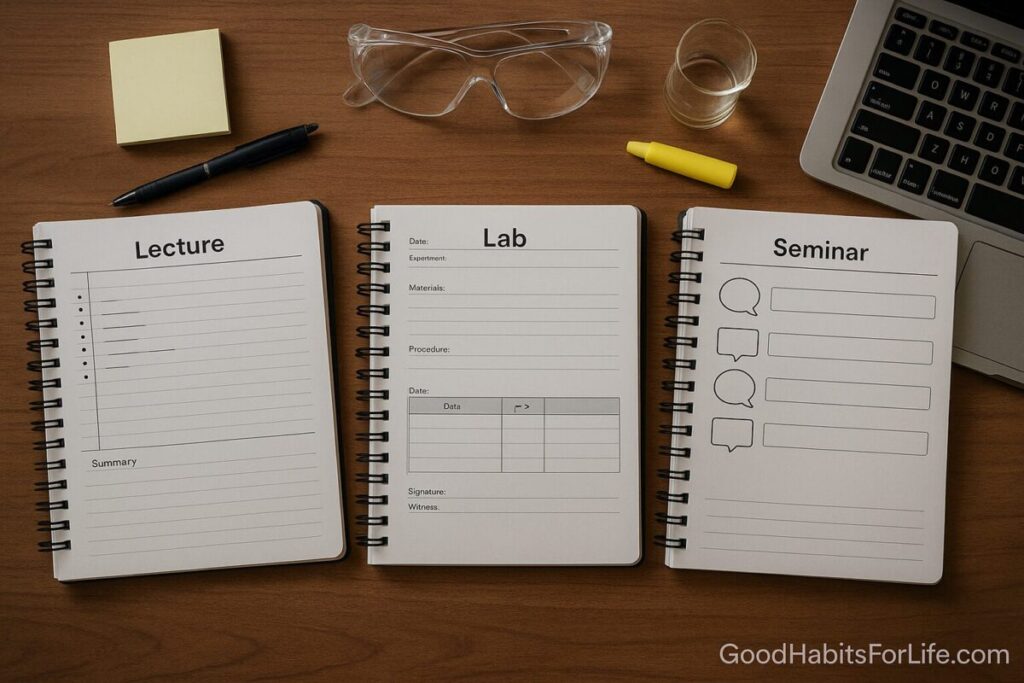
Lecture, Lab, Seminar: Three Note Templates
Three Note Templates: Lecture Lab Seminar
Table of Contents
🧭 What & Why
One size does not fit all. Lectures, labs, and seminars have different goals and rhythms, so the way you capture information should change too.
-
Lecture: High-bandwidth input from one speaker. Goal: extract structure, core ideas, and relationships.
-
Lab: Hands-on procedures and data. Goal: create a legally/academically sound record you (or others) can reproduce.
-
Seminar: Discussion-driven meaning-making. Goal: track arguments, evidence, and your evolving stance.
Benefits of using tailored templates
-
Faster capture because the page prompts what matters.
-
Better recall through deliberate cues, summarizing, and later retrieval practice.
-
Clearer study artifacts: clean problem sets, traceable data, defensible claims.
Quick comparison
| Context | Primary aim | Best structure | Hallmark fields |
|---|---|---|---|
| Lecture | Understand & organize | Cornell-style with cues & summary | Keywords/cues, main notes, 2-min summary |
| Lab | Reproducibility & integrity | Structured notebook | Objective, materials, steps, data tables, results, next steps |
| Seminar | Synthesize & argue | Dialog map | Claims, evidence, counterpoints, quotes, action items |
✅ Quick Start (Do This Today)
-
Pick your template (below) for today’s session. Print one page or duplicate a digital block.
-
Pre-fill metadata (1 min): course/topic, date, session goal, reading link(s).
-
Signal space: divide the page exactly as shown in each template.
-
Write in bullets, not sentences. Abbreviations are fine; capture meaning first.
-
Timestamp major transitions (e.g., “10:22 demo starts”).
-
End with a 2-minute summary: 3 bullets of “What I learned / What to do next.”
-
Same day review (≤10 min): add 1–3 questions to quiz yourself later; schedule spaced reviews.
🛠️ The Three Templates
Lecture Notes — Cornell-plus
When: Lectures, talks, video lessons, briefings.
Page layout (print or digital block):
-
Header (single line): Course/Topic | Lecturer | Date | Session Goal
-
Right 70% – Notes: bullet stream of ideas, examples, diagrams.
-
Left 30% – Cues/Keywords: questions, headings, formulas to quiz later.
-
Footer – Summary (2–4 lines): “If I had to teach this in 60 seconds…”
Copy-paste template (Gutenberg-friendly):
How to use: Write notes on the right during the talk; add cues on the left during micro-pauses or right after. Finalize summary before you leave.
Lab Notes — Structured Scientific Notebook
When: Wet labs, fieldwork, engineering builds, code experiments.
Principles: completeness, legibility, reproducibility, and integrity (date, signatures if needed).
Copy-paste template:
Tips: Number pages, don’t remove pages, pen for physical notebooks, immediate cross-refs to files (e.g., /data/2025-09-14-exp3.csv), and sign/verify if your course requires it.
Seminar Notes — Dialog Map
When: Book clubs, case seminars, colloquia, tutorials.
Goal: capture claims, evidence, alternatives, and your stance.
Copy-paste template:
Tips: Use initials instead of full names for speed; mark “E:” for evidence, “C:” for counter; end by writing a 3-bullet synthesis.
📅 7-Day Starter & 30-60-90 Habit Plan
7-Day Starter
-
Day 1: Pick one upcoming session for each context. Print/duplicate the three templates.
-
Day 2: Run the Lecture template once; do a same-day 10-minute review.
-
Day 3: Run the Lab template on a small experiment or coding task; capture data in a table.
-
Day 4: Run the Seminar template; write a 3-bullet synthesis.
-
Day 5: Create 3 retrieval questions per session (turn cues into questions).
-
Day 6: First spaced review (5–10 min each).
-
Day 7: Tidy metadata, link slides/papers, and prep templates for next week.
30-60-90 Tune-Up
-
30 days: Standardize abbreviations, add keyboard snippets/shortcuts, create a master index page.
-
60 days: Add dual-coded visuals (simple diagrams for tough concepts), automate spaced review reminders.
-
90 days: Audit outcomes: grades, lab results quality, seminar contributions. Keep what works; archive what doesn’t.
🧠 Techniques & Frameworks That Make Notes Stick
-
Retrieval practice: quiz from your cues without looking; then check.
-
Spaced repetition: review after 1 day, 1 week, 2–3 weeks, 2–3 months—stretch intervals.
-
Dual coding: pair text with simple sketches/flows; annotate diagrams with labels.
-
Elaboration: ask “why/how” and link to prior knowledge.
-
Interleaving: mix problem types in reviews to strengthen discrimination.
-
Cognitive load management: segment content, use headings, and mark key steps; avoid over-highlighting.
-
2-minute teach-back: summarize aloud from memory; if you stall, your notes are missing a cue.
👥 Audience Variations
-
Students: keep templates in a single notebook/binder; mark exam-relevant cues with ★.
-
Professionals: adapt “Lab” to product experiments or analytics; log links to dashboards and commits.
-
Seniors / Lifelong learners: use larger fonts and more white space; add a brief glossary per course.
-
Teens: color-code cues (max 3 colors) and add a “one example I can explain to a friend.”
-
Non-native English speakers: pre-write domain vocabulary in the cue column with translations.
⚠️ Mistakes & Myths to Avoid
-
Myth: “Typing everything equals good notes.” → Quality beats volume; retrieval beats transcription.
-
Mistake: skipping metadata (date, topic, goal). → makes review/search painful.
-
Mistake: only highlighting. → converts to passive reading.
-
Mistake: no timestamps in labs. → harms reproducibility and credibility.
-
Mistake: seminar notes as quotes only. → track claims + evidence + your stance.
-
Mistake: digital-only with no backups. → export weekly; keep a print or PDF archive.
💬 Real-Life Examples & Scripts
Lecture snippet (Calculus, chain rule)
-
Cues: chain rule; composite f(g(x)); derivative of e^(3x)
-
Notes: d/dx f(g(x)) = f’(g(x))·g’(x); ex: d/dx e^(3x) = e^(3x)·3
-
Summary: Chain rule = outer’(inner)×inner’. Practice 5 problems.
Lab snippet (Enzyme assay)
-
Objective: estimate Vmax, Km for lactase at 25 °C (77 °F)
-
Data table: [S] (mM): 2,4,6,8; v0 (µmol/min): 0.8, 1.2, 1.5, 1.6
-
Result: Non-linear fit suggests Km ≈ 4.9 mM; Vmax ≈ 1.7 µmol/min.
-
Next steps: repeat at 37 °C (99 °F); check pipette calibration.
Seminar snippet (Ethics case)
-
Claim A: “Autonomy > beneficence in this scenario.” Evidence: Beauchamp & Childress, p. 106.
-
Counter: “Risk profile undermines informed consent.”
-
My stance: Autonomy holds if risk comprehension is demonstrable; propose teach-back checklist.
Scripts to use in the moment
-
“Can I restate that to check I’ve got it?”
-
“What would change the conclusion—different assumptions or data?”
-
“Which step commonly fails in practice?”
-
“If I had only one formula to memorize from today, which is it?”
🧰 Tools, Apps & Resources
-
Microsoft OneNote / Apple Notes / Google Docs: easy, cross-platform; simple tables. Cons: less powerful backlinking.
-
Notion / Obsidian: templates, backlinks, daily notes, spaced-review plugins. Cons: learning curve.
-
GoodNotes / Nebo (tablet): handwriting + shape recognition. Cons: export/backup discipline needed.
-
PDF annotators (e.g., Acrobat, Xodo): great for readings; link page refs into Seminar notes.
-
Spaced-repetition (Anki, RemNote): convert cues to cards in minutes; schedule reviews automatically.
-
Version control & data links for labs: link code commits (e.g., GitHub), datasets, and images directly in “Attachments.”
📌 Key Takeaways
-
Templates reduce friction and bias you toward the right details for each context.
-
Summaries + questions convert notes into learning tools.
-
Timestamped, structured lab notes protect reproducibility.
-
Dialog maps turn messy discussions into clear positions with evidence.
-
Small, steady habits (2-minute summary, spaced reviews) drive long-term retention.
❓ FAQs
1) Should I type or handwrite?
Either works; choose the method you’ll actually review. Typing is faster; handwriting can improve processing. Pair with retrieval practice either way.
2) How long should a 2-minute summary be?
Three crisp bullets or ~50–80 words. If it takes longer, your notes are too detailed or you need clearer cues.
3) How do I convert lecture cues into quiz questions?
Turn headings into why/how prompts: “Why does interleaving help?” or “How to apply the chain rule to nested functions?”
4) What belongs in a lab “Deviations” section?
Anything not per plan: different batch, altered temperature, step skipped, equipment error. Include time and reason.
5) How do I capture fast-moving seminars?
Track claims → evidence → counterpoints. Use initials, arrows, and a running “My Synthesis” box to update your stance.
6) How often should I review notes?
Same day (≤10 min), then at ~1 week, ~3 weeks, and ~2–3 months. Adjust to exam or project timelines.
7) Can I use the seminar template for team meetings?
Yes—replace citations with metrics/tickets; keep “claim/evidence/counterpoint/action” structure.
8) What if slides are posted? Do I still take notes?
Yes; take process and connection notes (why, comparisons, pitfalls) rather than copying slide text.
9) How do I link physical lab notes to digital data?
Write the file path/ID in the notebook and include a QR/short link. Mirror that ID in the dataset/readme.
10) How big should data tables be in class?
Start minimal (variables, units, 3–5 trials). Expand when you transcribe to your master record.
📚 References
-
Cornell University Learning Strategies Center. The Cornell Note-Taking System. https://lsc.cornell.edu/how-to-study/taking-notes/
-
Dunlosky, J., Rawson, K. A., Marsh, E. J., et al. (2013). Improving Students’ Learning With Effective Learning Techniques. Psychological Science in the Public Interest. https://doi.org/10.1177/1529100612453266
-
Karpicke, J. D., & Roediger, H. L. (2008). The critical importance of retrieval for learning. Science. https://doi.org/10.1126/science.1152408
-
Cepeda, N. J., Pashler, H., Vul, E., et al. (2006). Distributed practice in verbal recall tasks. Psychonomic Bulletin & Review. https://doi.org/10.3758/BF03193957
-
The Learning Scientists. Six Strategies for Effective Learning (Retrieval, Spacing, Interleaving, Dual Coding, Elaboration, Concrete Examples). https://www.learningscientists.org/
-
MIT Office of Research Compliance. Maintaining a Laboratory Notebook. https://researchcompliance.mit.edu/research-integrity/maintaining-laboratory-notebook
-
University of Michigan Library. Lab Notebooks & Reproducibility. https://guides.lib.umich.edu/labnotebooks
-
Harvard Bok Center. Facilitating Discussions. https://bokcenter.harvard.edu/active-learning/facilitating-discussions
-
Mayer, R. E. (2020). Multimedia Learning (3rd ed.). Cambridge University Press – summary of signaling/segmenting principles: https://www.cambridge.org/highereducation/books/multimedia-learning
-
NSW Department of Education (CESE). Cognitive Load Theory: Research that Teachers Really Need to Understand. https://www.cese.nsw.gov.au/publications-filter/cognitive-load-theory