
Language Barriers: Simple Tools for Connection
Language Barriers: Simple Tools for Connection
Table of Contents
🧭 What & Why
Language barriers are any obstacles that make it difficult for people who don’t share a language (or share it at different proficiency levels) to understand each other. Breaking them down improves trust, safety, and inclusion—whether you’re welcoming a new neighbor, collaborating at work, or talking with your child’s teacher. Public-health and international organizations emphasize plain language and multilingual communication because people act on information they clearly understand. World Health Organization+1
The benefits of bridging language gaps include fewer misunderstandings, faster problem-solving, better participation at school/work, and more equitable access to services. In health settings, using qualified interpreters improves safety and reduces risk; children should not be used to interpret. GOV.UK
✅ Quick Start: Connect in 10 Minutes
-
Set the tone: Smile, slow down, and pause often. Keep sentences short (10–15 words). Avoid slang and idioms (e.g., say “start” not “kick off”). CDC
-
Chunk & check: Share one idea at a time, then teach-back (“Could you tell me the time and place for tomorrow in your words?”). AHRQ+1
-
Use visuals: Write dates (DD-MM-YYYY), numbers, and names; add a small sketch/map if helpful. World Health Organization
-
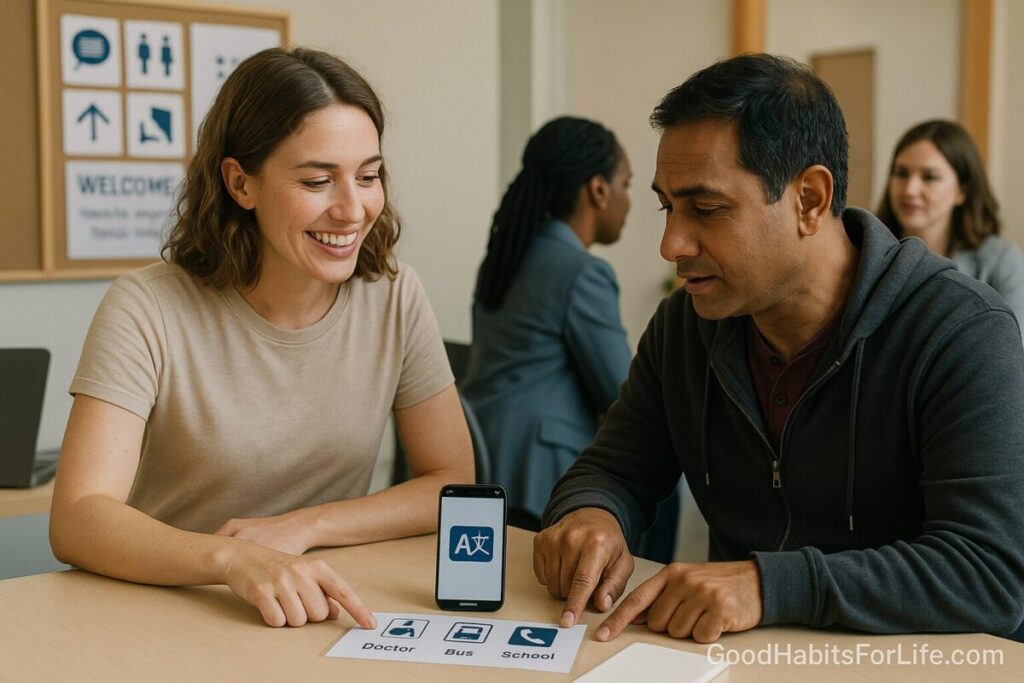
Tap translation tools: Open a conversation mode app; download offline languages if Wi-Fi is spotty. Google Help+1
-
Mind gestures: Demonstrate actions but remember gestures vary across cultures; confirm meaning verbally. SpringerLinkAPA
-
Close with clarity: Repeat key details, write them down, and confirm next steps with teach-back. AHRQ
🗓️ 7-Day Starter Plan
Goal: Make inclusive, low-friction communication your default.
Day 1 – Audit your language.
List phrases you often use that might confuse (idioms, phrasal verbs). Replace with everyday words (e.g., “check” → “confirm,” “ASAP” → “as soon as possible”). CDC
Day 2 – Set up your tools.
Install a translator app with conversation and camera modes; download two offline language packs you’re likely to need. Practice a 2-minute translated chat. Google Help+1
Day 3 – Visual defaults.
Create a one-page “communication sheet” template with: date/time, place/map, cost, items to bring, contact details. Use icons or emojis sparingly.
Day 4 – Teach-back reps.
Run three everyday interactions with teach-back (e.g., “When is the meeting?” “How will you get there?”). AHRQ
Day 5 – Gesture awareness.
Observe which gestures you use. Replace ambiguous ones with clear verbal confirmation. SpringerLink
Day 6 – Accessibility check.
If someone lip-reads or uses sign language, ensure good lighting, minimal background noise, or captions—offer an interpreter when stakes are high. Global Disability Fund
Day 7 – Review & refine.
What worked? What tripped you up? Adjust your template and app settings; add new phrases to your “saved translations.”
🧠 Techniques & Frameworks that Work
Plain-Language “3S” Rule
Short sentences. Simple words. Single idea per line. This boosts comprehension across languages and literacy levels. Pair with visuals for clarity. World Health OrganizationCDC
Teach-Back (Gold Standard Confirmation)
After sharing key info, ask the other person to explain it back in their own words—then fill gaps. Proven to improve understanding and outcomes. AHRQPMC
Conversation Mode + Camera Translate
Use bilingual face-to-face or live conversation features for natural back-and-forth. Use camera translate for signs, menus, and forms; enable offline packs for low-connectivity areas. Google Help+1Google Translate
Culturally Smart Nonverbal
Facial expressions and eye contact aren’t universal. Treat nonverbal cues as hypotheses, not facts; verify aloud. APASpringerLink
Interpreters for High-Stakes Topics
In healthcare, legal, and safeguarding contexts, use qualified interpreters—not family members, and never children. GOV.UK
👥 Audience Variations
Students & Teens
-
Use split-screen conversation modes in class; caption videos.
-
Replace idioms in instructions; add images or demos. Microsoft
Parents
-
Send school updates in plain language with bullet points and dates.
-
Offer translated one-page summaries for events/consent.
Professionals
-
Open meetings with a shared note doc; write decisions and owners live.
-
For cross-border teams, agree on date/time formats and template agendas.
Seniors
-
Prioritize legible print, larger font, and slower pacing; repeat key info and write it down.
-
Offer in-person or phone interpreters for appointments. GOV.UK
Newcomers & Migrants
-
Provide multilingual welcome sheets and a glossary of local services.
-
Encourage community language classes and conversation clubs. (Integration data underline the long-term value of language access.) OECD
⚠️ Mistakes & Myths to Avoid
-
Myth: “Gestures are universal.”
Reality: Many gestures vary by culture; confirm verbally. APA -
Mistake: Using machine translation for sensitive topics.
Fix: Use professional interpreters in health/safety/legal contexts. GOV.UK -
Mistake: Asking a child to interpret.
Fix: This increases risk and trauma; always avoid. GOV.UK -
Mistake: Info-dumping.
Fix: Chunk content and use teach-back to confirm understanding. AHRQ -
Myth: “Slow = rude.”
Reality: Thoughtful pacing plus everyday words is respectful and effective. CDC
🛠️ Real-Life Examples & Scripts
Invite to an event
-
“We meet on Tuesday, 15-10-2025, 6:30–7:30 pm, at Community Hall, MG Road. Bring ID. Can you tell me the time and place?” (teach-back)
Clarifying directions
-
“Go 200 metres to the roundabout, turn left, then second building. Does that match what you understood?” (pause for teach-back)
At school pickup
-
“Today your child needs sports shoes and water bottle. Practice is from 4:00–5:00 pm. Please repeat the time.” (teach-back)
At the clinic (with interpreter)
-
“I will speak in short sentences and pause. Please interpret everything I say. After we finish, I’ll ask for a repeat of the plan to make sure it’s clear.” GOV.UK
📚 Tools, Apps & Resources (Pros & Cons)
| Tool | Best For | Pros | Watch-outs |
|---|---|---|---|
| Google Translate (web/app) | Everyday chats, menus, signs | Conversation & camera modes; offline packs; cross-platform | Quality varies by language/domain; avoid for sensitive decisions Google Help+1Google Translate |
| Microsoft Translator | Group conversations, education | Live multi-device conversation; offline text packs; captions | Some features require account/admin setup in orgs Microsoft+1translator.microsoft.com |
| DeepL (Pro) | High-quality text translation | Strong privacy options (no text stored with Pro), enterprise security | Fewer languages than some competitors; paid tiers for privacy features deepl.com+1 |
| Language ID charts / pictoboards | Identifying languages, basics | Quick discovery, visual support | Not a substitute for interpreters in complex topics GOV.UK |
Tip: Save frequent phrases (e.g., dates, addresses, meeting links) in your app’s “favorites” for one-tap reuse. Microsoft
🧩 Key Takeaways
-
Keep it plain and visual; one idea at a time. World Health OrganizationCDC
-
Use teach-back to confirm understanding. AHRQ
-
Leverage conversation/camera translation with offline packs. Google Help+1
-
Remember nonverbal varies; verify aloud. APA
-
For high-stakes topics, hire interpreters—not family/children. GOV.UK
❓ FAQs
1) Which is the most accurate translator app?
There’s no single winner across all languages and contexts. For everyday use, Google and Microsoft offer strong camera/voice features; paid options like DeepL Pro emphasize privacy and high-quality text in supported languages. Test with your common phrases. Google TranslateMicrosoftdeepl.com
2) When should I call a professional interpreter?
Any time decisions affect health, safety, finance, or legal issues—or when precision matters. Many health systems explicitly advise qualified interpreters and not family/children. GOV.UK
3) Are gestures safe to rely on?
Use them as support, not proof. Facial expressions and gestures differ across cultures; confirm verbally. APA
4) How do I make written info easier to understand?
Use everyday words, short sentences, bullet points, white space, and clear date/time formats. Pair with icons or images. CDCWorld Health Organization
5) What if the app mangles a sentence?
Rephrase simply. Replace idioms (“hit the ground running”) with plain language (“start quickly”), then ask for teach-back. CDCAHRQ
6) How do I prepare for a cross-language meeting?
Share an agenda with times, locations, and decisions needed; set up conversation mode; agree on date formats; nominate someone to capture actions live.
7) Is offline translation worth it?
Yes—download language packs so camera/text translation works without data. Great for travel or low-connectivity workplaces. Google Help
8) What about accessibility and disability inclusion?
Provide captioning, sign-language support, or alternative formats as needed. Follow disability-inclusive communication guidelines. Global Disability Fund
References
-
World Health Organization — Use Plain Language and related guidance on understandable, multilingual communication. https://www.who.int/about/communications/understandable/plain-language ; https://www.who.int/about/policies/multilingualism World Health Organization+1
-
CDC Health Literacy — Plain Language Materials & Resources. https://www.cdc.gov/health-literacy/php/develop-materials/plain-language.html CDC
-
AHRQ — Teach-Back Tool & Health Literacy Universal Precautions Toolkit (3rd ed.). https://www.ahrq.gov/teamstepps-program/curriculum/communication/tools/teachback.html ; https://www.ahrq.gov/sites/default/files/publications2/files/health-literacy-universal-precautions-toolkit-3rd-edition.pdf AHRQ+1
-
GOV.UK (Office for Health Improvement & Disparities) — Language Interpreting and Translation: Migrant Health Guide. https://www.gov.uk/guidance/language-interpretation-migrant-health-guide GOV.UK
-
APA — Perception of facial expressions differs across cultures. https://www.apa.org/news/press/releases/2011/09/facial-expressions APA
-
Springer (2024) — Cross-cultural differences in using nonverbal behaviors to identify indirect replies. https://link.springer.com/article/10.1007/s10919-024-00454-z SpringerLink
-
OECD & European Commission (2023) — Indicators of Immigrant Integration 2023. https://www.oecd.org/en/publications/2023/06/indicators-of-immigrant-integration-2023_70d202c4.html OECD
-
UNPRPD (2023) — Disability-Inclusive Communications Guidelines. https://unprpd.org/new/wp-content/uploads/2023/12/UN_Disability-Inclusive_Comms_Guidelines_FINAL-d8a.pdf Global Disability Fund
-
Google — Translate: Face-to-face/Conversation & Camera Translate (Support + About). https://support.google.com/translate/answer/6142474 ; https://support.google.com/translate/answer/6142483 ; https://translate.google.com/about/ Google Help+1Google Translate
-
Microsoft — Translator: App Features & Live Conversations. https://www.microsoft.com/en-us/translator/apps/features/ ; https://www.microsoft.com/en-us/translator/education/live-conversations/ Microsoft+1
-
DeepL — EU Data Protection & Pro Data Security. https://www.deepl.com/en/pro-privacy_info ; https://www.deepl.com/en/pro-data-security deepl.com+1