
Desk Workers: AntiHunch Protocol
Desk Workers: Anti-Hunch Protocol
Table of Contents
🧭 What & Why
What is “hunching”?
The desk hunch is a pattern of forward head, rounded shoulders, and stiff upper back (thoracic kyphosis) that builds up with long sitting and screen work. It can contribute to neck/shoulder discomfort, headaches, and reduced breathing efficiency.
Why this protocol works
-
Ergonomics reduces strain by aligning joints so muscles don’t overwork.
-
Movement “snacks” break up sedentary time, improving circulation and lowering musculoskeletal risk.
-
Targeted exercises (thoracic extension + scapular retraction + deep-neck flexor control) restore positions needed for tall, relaxed posture.
-
Habit scaffolding (timers, cues, tracking) makes it stick.
Evidence snapshot (plain English):
-
Health agencies recommend breaking up sitting with light activity.
-
Workstation fit (screen height, elbow angle, neutral wrists) helps prevent neck/shoulder complaints.
-
Strength + mobility for the upper back/shoulder complex can improve posture and reduce pain.
(See References.)
✅ Quick Start (Do This Today)
Step 1 — Set your station (5 minutes)
-
Chair: Hips slightly higher than knees; back supported. If feet don’t reach floor, use a footrest or a sturdy book.
-
Keyboard/Mouse: At elbow height with elbows ~90–110°; wrists neutral.
-
Monitor: Top of screen at eye level; distance 50–75 cm (20–30 in); tilt slightly back.
-
Laptop? Use a laptop stand + external keyboard & mouse.
Step 2 — Learn the Posture Reset (60 seconds)
-
Chin nod (draw chin straight back, not down).
-
Ribs down (exhale gently to stack ribs over pelvis).
-
Shoulders back-and-down (think: “put shoulder blades in your back pockets”).
-
Long neck breath: 3 slow nasal breaths.
Step 3 — 10-Minute Anti-Hunch Mini-Circuit
Perform once today (and daily):
-
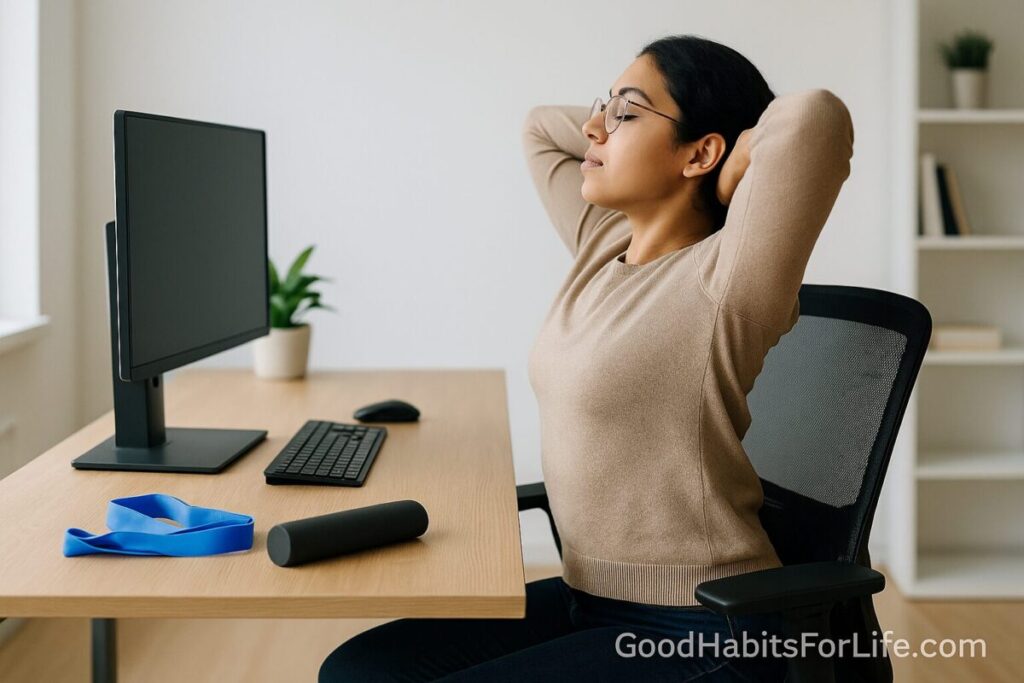
Thoracic Extension Over Chair — 2×8 slow reps (hands behind head, extend mid-back over the chair back).
-
Wall Angels — 2×8 (heels, hips, upper back to wall; slide arms up/down keeping ribs down).
-
Band Pull-Apart / Row — 2×12 (light resistance band, elbows soft, squeeze between shoulder blades).
-
Deep-Neck Flexor Nod — 2×6 (lying, tiny nods; keep throat relaxed).
-
Doorway Pec Stretch — 2×30 s each side.
Step 4 — Adopt the 30-2-1 Rule
Every 30 minutes, stand 2 minutes, do 1 Posture Reset (or 10 band pull-aparts). Use a timer app.
Step 5 — Track it
At day’s end, log: minutes moved, sets done, discomfort (0–10). Aim: trend downward in discomfort over 2–4 weeks.
🛠️ 7-Day Starter & 30-60-90 Roadmap
7-Day Starter (10–15 min/day)
-
Day 1–2 (Setup + Awareness): Fix workstation; learn Posture Reset; Mini-Circuit ×1.
-
Day 3–4 (Consistency): Mini-Circuit ×1; 30-2-1 timers during work; add 5-minute walk at lunch.
-
Day 5 (Progression): Mini-Circuit ×2 (shorter rests).
-
Day 6 (Mobility Focus): Add cat-camel 2×8 + prone Y-T 2×8.
-
Day 7 (Review): Check logs; reduce any exercise causing pain; plan next block.
30-60-90 Day Roadmap
30 Days — Foundation
-
Mini-Circuit 5 days/week (10–15 min).
-
30-2-1 timers on workdays.
-
Walk 30–40 min/day total (can be split).
Checkpoint: Discomfort down ≥2 points; can hold tall posture 10 minutes without cueing.
60 Days — Build Capacity
-
Add progressive band rows or dumbbell rows (2–3×/week, 3×8–12).
-
Include thoracic rotation drills (open books 2×8/side).
-
One mobility day (foam roller thoracic extensions, 3×10 gentle reps).
Checkpoint: Noticeably easier to maintain neutral head/shoulders late in the day.
90 Days — Maintain & Personalize
-
Alternate strength days (rows, face pulls, reverse flys) with mobility days.
-
Keep 30-2-1 timers; test no-timer days once a week—self-cueing should kick in.
Checkpoint: Stable comfort scores ≤2/10 on typical workdays.
🧠 Techniques & Frameworks
The 30-2-1 Rule
-
Why: Even perfect posture gets tired; the fix is frequent small breaks.
-
How: Timer every 30 min → stand/walk 2 min → 1 Posture Reset or 10 band pulls.
S-E-T Framework (Setup → Exercise → Track)
-
Setup your workstation first.
-
Exercise daily (10-minute circuit).
-
Track 3 numbers nightly to drive behavior.
Cues You Can Feel
-
“Long spine, soft ribs, heavy shoulders.”
-
“Eyes to horizon, chin glides back.”
Breath-First Reset
-
4–6 slow nasal breaths with long exhales to relax neck/upper-trap tension.
Progression Levers
-
More time under tension (slower eccentrics).
-
Load (stronger band/dumbbell).
-
Volume (add a third set).
👥 Audience Variations
Students / Remote workers
-
Budget kit: laptop stand, external keyboard/mouse, light band.
-
Use campus/library standing desks when possible.
Professionals in long meetings
-
Stand or do seated scap squeezes during calls.
-
Convert 1× meeting/day to walking meeting if feasible.
Seniors
-
Prioritize balance-safe variations (supported rows, gentle wall slides).
-
Shorter bouts (6–8 reps); more frequent breaks.
Teens/Gamers
-
Console/PC: raise screen to eye level; controller breaks every game load.
-
Add face pulls 2×/week to counter heavy screen time.
New lifters
-
Start with bands before dumbbells; maintain talk-test breathing.
⚠️ Mistakes & Myths to Avoid
-
Myth: “There’s one perfect posture.”
Reality: Your next posture is the best posture—keep changing positions. -
Mistake: Only stretching the chest without strengthening upper back.
Fix: Pair pec stretch with rows/pull-aparts. -
Mistake: Forcing a military-rigid chest-up pose.
Fix: Keep ribs down and breathe; aim for relaxed tall. -
Myth: “Standing desks solve everything.”
Reality: They’re helpful, but movement breaks still matter. -
Mistake: Ignoring screen height—instant neck strain multiplier.
🗣️ Real-Life Examples & Scripts
1) 20-Second Micro-Break Script (at your desk)
“Stand → inhale tall → chin glide → shoulders back-down → 10 band pulls → exhale long.”
2) Slack/Teams status template
“Brb 2-min movement break (back at :02).”
3) Ask-your-manager message
“Quick ergonomic Q: Can I add a laptop stand + ext. keyboard to keep screen at eye level? Should reduce neck strain and improve focus.”
4) Self-talk anchor
“Ribs down, chin back, type light.”
🧰 Tools, Apps & Resources
Hardware (low-cost, high impact)
-
Laptop stand (adjustable) — puts screen at eye level; still need external keyboard/mouse.
-
External keyboard & mouse — allow elbows at 90–110°, wrists neutral.
-
Resistance bands — portable for rows/pull-aparts.
-
Footrest — if feet don’t reach floor; reduces low-back strain.
-
Lumbar support cushion — fills the chair gap if needed.
Apps / Timers
-
Workrave / Stretchly / Stand Up! / Focus To-Do (Pomodoro) — nudge 30-2-1 breaks; simple analytics.
-
Phone alarms — set repeating 30-minute alerts if apps aren’t allowed at work.
Pros/Cons (quick)
-
Stands & peripherals: 🎯 Best alignment; 💸 small cost.
-
Bands: 🎯 Strength anywhere; 💼 easy to carry; 🔄 replace when worn.
-
Timers: 🎯 Consistency driver; 🔔 can feel naggy—tune frequency.
📌 Key Takeaways
-
A great desk setup + frequent small movement + targeted upper-back work beats “sitting up straight” alone.
-
The 10-minute circuit and 30-2-1 rule deliver compounding benefits.
-
Track three things nightly to keep the habit alive.
-
Progress load and volume gradually after 30 days.
❓ FAQs
1) How soon should I feel change?
Many feel easier breathing and less neck tension within 1–2 weeks; strength/posture endurance improves across 4–8 weeks.
2) Is a standing desk required?
No. It’s optional. The real win is breaking up sitting and aligning your station.
3) What if wall angels hurt my shoulders?
Reduce range, keep ribs down, or swap to floor snow angels or scapular retractions with a light band.
4) How high should my screen be?
Top of screen at eye level; you should look slightly down to the center of the screen.
5) Can I just stretch my chest?
Stretching helps, but pair it with rows/pull-aparts for lasting change.
6) Are posture braces a good idea?
They can cue position briefly, but rely on muscle strength and movement for long-term results.
7) What if I already work out?
Keep your training; add thoracic mobility, face pulls, and rows on upper-body days. Maintain 30-2-1 at work.
8) Will this help headaches from screen time?
Improved head/neck alignment and movement breaks often reduce tension-type headaches; consult a clinician for persistent symptoms.
📚 References
-
World Health Organization. Guidelines on Physical Activity and Sedentary Behaviour (2020). https://www.who.int/publications/i/item/9789240015128
-
UK Health and Safety Executive (HSE). Working with display screen equipment (DSE). https://www.hse.gov.uk/msd/dse/
-
U.S. Department of Labor, OSHA. Computer Workstations eTool. https://www.osha.gov/etools/computer-workstations
-
CDC/NIOSH. Ergonomics and Musculoskeletal Disorders. https://www.cdc.gov/niosh/topics/ergonomics/
-
Cornell University Ergonomics Web. Computer workstation guidelines. https://ergo.human.cornell.edu/
-
Cochrane Review. Workplace interventions for neck/shoulder pain in office workers. (e.g., Hoe et al.) https://www.cochranelibrary.com/
-
American Physical Therapy Association (ChoosePT). Posture and Movement: Tips for Desk Workers. https://www.choosept.com/
-
Mayo Clinic. Office ergonomics: Your how-to guide. https://www.mayoclinic.org/healthy-lifestyle/adult-health/in-depth/office-ergonomics/art-20046169
Disclaimer: This guide is educational and not a substitute for personalized medical or physical therapy advice—consult a qualified professional for pain or injury.