
CashFlow Calendar: Put Dates to Your Money: No-Spend Challenge (2025)
Cash Flow Calendar & No-Spend Challenge (2025)
Table of Contents
🧭 What is a Cash Flow Calendar (and Why It Works)
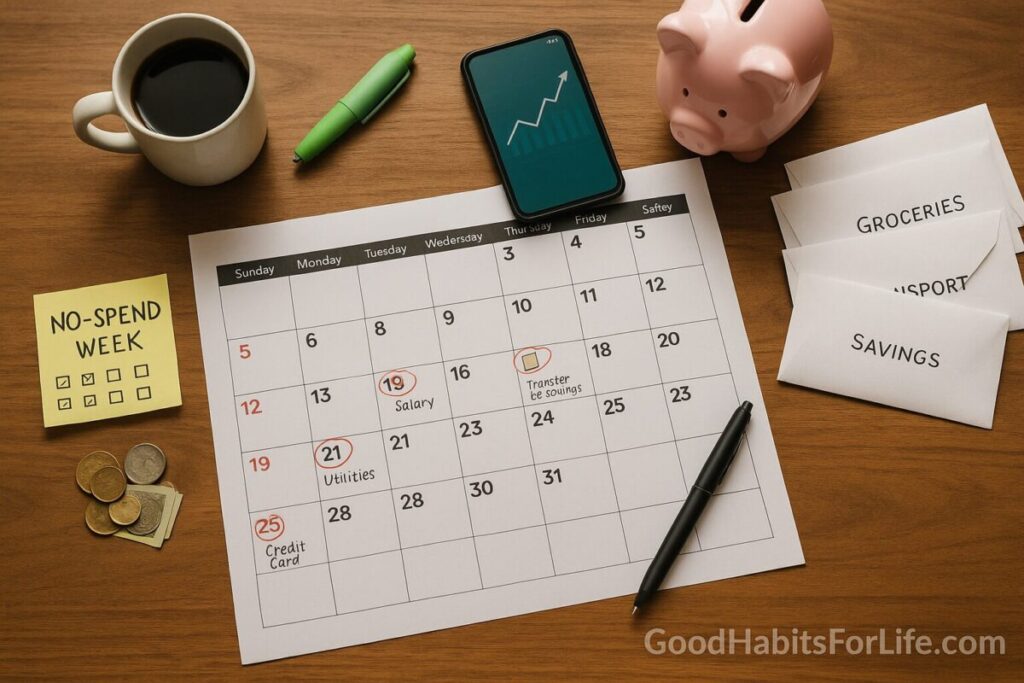
A cash flow calendar is a month-view of your money that assigns dates to every inflow (salary, side-income) and every outflow (bills, transfers, subscriptions, debt payments). Put simply: if it touches your money, it has a date. This visual plan helps you avoid late fees, smooth cash crunches, and prioritize savings. A calendar approach is widely recommended in personal finance education because it clarifies payment timing and makes budgets actionable. Consumer Financial Protection BureauPayPalNerdWallet
Why now? Household savings buffers are thin in many places. In the U.S., for example, the personal saving rate was ~4.4% in July 2025—well below long-term averages—while more adults report struggling to cover three months of expenses (46% in 2025 vs. 53% in 2021). Bureau of Economic Analysisfinrafoundation.org
Separately, no-spend challenges (short periods of intentional non-spending on wants) can improve self-awareness and curb impulse purchases, making them a useful on-ramp to better cash flow habits. Verywell Mind
✅ Quick Start: Set Yours Up Today (10 Steps)
-
Pick your canvas. Use Google Calendar, Apple Calendar, Notion, or a budgeting app with a month view. (Options below.) Kiplinger
-
Mark paydays/inflows. Add salary, freelance, side-hustles on their actual dates.
-
List fixed bills. Put due dates for rent/mortgage, utilities, insurance, EMIs/loan payments.
-
Add subscriptions. Note the dates for streaming, apps, gyms—decide to Keep / Pause / Cancel.
-
Schedule savings first. Create a recurring event on Day 1: “Transfer ₹___ to Emergency/Goal.” Automate it. (Pay-yourself-first improves outcomes.) Consumer Financial Protection Bureau
-
Map variable essentials. Groceries, transport, school costs—estimate weekly envelopes and place them on the calendar.
-
Color-code.
-
Green = Income
-
Red = Bills/Debt
-
Blue = Essentials
-
Gold = Savings/Investments
-
-
Set alerts. 3–5 days before each bill and the morning of.
-
Add a mini-review. Weekly 15-minute event: “Reconcile & adjust.”
-
Layer a 30-day no-spend. Choose a month; define Allowed (needs) vs Paused (wants); add a daily checkmark event. (Rules below.)
Tip: If your cash flow is lumpy/irregular, split big bills (e.g., 15th and 30th) or maintain a one-month “buffer” account so timing hiccups don’t trigger fees. Consumer Financial Protection Bureau
🛠️ The 30-60-90 Cash-Flow Roadmap
Days 1–30 (Stabilize)
-
Build the calendar, automate savings (even ₹500), run a no-spend month, and cancel at least two subscriptions.
-
Create one Sinking Fund (e.g., annual insurance).
-
Goal: Miss zero due dates; close the month with positive balance.
Days 31–60 (Strengthen)
-
Add debt-priority plan (e.g., avalanche).
-
Move essential variable spending into weekly caps.
-
Increase auto-savings by +10–20% if feasible.
Days 61–90 (Grow)
-
Add a second savings goal (e.g., emergency fund to 1 month of expenses).
-
Introduce a “Spend Window” (two 2-hour slots/week) to batch all wants—reduces impulse buys.
-
Quarterly review: compare your budget to a simple benchmark like 50/30/20—but adapt if your cost of living is high (some households use 60/30/10 temporarily). InvestopediaTIME
🧰 The 30-Day No-Spend Challenge (Rules, Variations, Calendar)
Core rule: For 30 days, buy only essentials (needs). Pause all wants. Define it in advance:
| Category | Allowed (Needs) | Paused (Wants) |
|---|---|---|
| Food | Groceries, staples | Restaurants, takeaway coffee, treats |
| Transport | Fuel, bus/metro passes | Ride-hailing upgrades |
| Home | Rent, utilities | Décor, gadgets |
| Health | Medicines, doctor fees | Supplements you don’t need now |
| Kids/School | Fees, uniforms | Toys beyond essentials |
Variations:
-
Weekday Freeze: No wants Mon–Thu.
-
Category Fast: e.g., “No fashion” month.
-
Spend-to-Zero: Use up pantry/freezer before any groceries (after essentials).
Daily calendar ritual (2 minutes):
☑ Check off “No-Spend Success” today.
🧾 Log any allowed essential spend.
🔁 If tempted, delay 48 hours and add the item to a “wish list” dated after the challenge.
Behaviorally, no-spend periods reduce impulsivity and increase awareness of emotional triggers for spending—use them to rewrite habits rather than to punish yourself. Verywell Mind
🧠 Techniques & Frameworks that Make It Stick
1) If-Then Plans (Implementation Intentions).
Write tiny rules that fire automatically: “If I open a shopping site, then I close it and add the item to my wish list.” These plans reliably boost goal follow-through in research. kops.uni-konstanz.deSPARQ
2) Commitment Devices.
Lock in good behavior (e.g., a separate bank account with withdrawal friction or “challenge pot” you forfeit if you break rules). Commitment savings products in field experiments raised savings substantially. Professor Nava Ashrafecon.yale.edu
3) Temptation Bundling.
Pair an effortful task with a treat (reviewing expenses only while listening to a favorite podcast). Trials show bundling increases follow-through. PMCScienceDirect
4) Pay-Yourself-First Automation.
Move savings on Day 1 so it’s not accidentally spent; this is a core consumer-finance best practice. Consumer Financial Protection Bureau
5) Reality-Check with Data.
Track the personal saving rate trend or your emergency-fund status each month. If national buffers are thin and prices bite, your plan matters even more. Bureau of Economic Analysisfinrafoundation.org
👥 Audience Variations
Students: Use a weekly money block (e.g., Sunday 18:00) to reconcile small spends; bundle it with music. Favor prepaid cards to cap wants.
Parents: Add school/seasonal sinking funds (fees, uniforms, holidays). Share the no-spend rules with kids; let them help pick free activities.
Professionals: Batch discretionary shopping into two windows/week; set a workday lunch cap in the calendar.
Seniors: Prioritize medication and utility autopay; schedule quarterly tariff reviews (insurance/phone/internet) to cut recurring costs.
Teens (with guardian): Use a simple jar system mirrored on the calendar (Spend/Save/Give). Keep rules short, visual, and reward streaks.
⚠️ Mistakes & Myths to Avoid
-
Myth: “No-spend means zero spending.” It allows essentials; the win is pausing wants. Verywell Mind
-
Starting with complex tools. Begin with a calendar + one account; add apps later. Consumer Financial Protection Bureau
-
Treating 50/30/20 as law. It’s a guide—adjust to your income and city; some seasons may look like 60/30/10. InvestopediaTIME
-
Ignoring timing. Most overdrafts are timing problems, not math—dates fix timing. NerdWallet
-
Keeping dead subscriptions. Prune monthly; redirect the savings to goals. Consumer Financial Protection Bureau
💬 Real-Life Examples & Copy-Paste Scripts
No-Spend Rules (copy-paste):
-
“For 30 days I’ll buy only essentials (food staples, rent, utilities, transport, medicines). I’ll pause restaurants, delivery, non-essential shopping, and entertainment. If tempted, I’ll wait 48 hours and add to wish list dated after the challenge.”
Buddy Text:
“I’m doing a 30-day no-spend to boost my savings. Want to swap free activity ideas and check in on Fridays?”
Vendor Call Script (Subscriptions):
“I’m reviewing monthly expenses and need to cancel [service] today. Please confirm the last bill date and any proration.”
Calendar Event Titles:
-
“Day-1: Auto-transfer ₹___ to Emergency Fund”
-
“15th: Rent/Mortgage (alert 5 days prior)”
-
“Fri 18:00: 15-min Reconcile & Wins 🎧”
🧰 Tools, Apps & Resources (Pros/Cons)
-
YNAB (You Need A Budget): Envelope style, strong cash-flow rules; learning curve; paid. Kiplinger
-
Simplifi by Quicken: Friendly UI, future cash-flow projections; subscription. Kiplinger
-
Tiller: Google Sheets/Excel feeds; great control; spreadsheet comfort required. Kiplinger
-
Monarch: Collaborative; goal tracking; paid. Kiplinger
-
PocketGuard / Honeydue: Debt or couples focus; features vary by region. Kiplinger
-
Empower: Strong for investment tracking; budgeting lighter. Kiplinger
Note: Mint was discontinued (Mar 23, 2024); Credit Karma isn’t a full budgeting replacement—consider alternatives above. ForbesInvestopedia
Free education & worksheets: CFPB tools; Consumer.gov budget worksheets (FTC). Consumer Financial Protection Bureauconsumer.gov
📚 Key Takeaways
-
Calendars turn budgets into do-able dates; dates prevent timing mistakes. NerdWallet
-
Automate savings at the start of the month; track emergency-fund progress. Consumer Financial Protection Bureaufinrafoundation.org
-
A 30-day no-spend is a practical reset—define essentials, log daily, and celebrate streaks. Verywell Mind
-
Support your plan with behavior science: if-then plans, commitment devices, temptation bundling. kops.uni-konstanz.deProfessor Nava AshrafPMC
-
Use modern apps; avoid dead tools; review subs monthly. KiplingerForbes
❓ FAQs
1) Cash flow calendar vs. budget—what’s the difference?
A budget sets amounts for categories; a cash flow calendar sets dates for all money moves. Use both together. NerdWallet
2) How long should a no-spend last?
Commonly 30 days; try 7 days to start or extend to 60 with one “treat window” per week if needed. Verywell Mind
3) What counts as “essential”?
Housing, utilities, basic food, transport, healthcare, critical school needs. Pre-define your list to avoid decision fatigue. consumer.gov
4) I have irregular income—can this work?
Yes: create a one-month buffer, schedule bills after inflow dates, and split large payments mid-month. Consumer Financial Protection Bureau
5) Is 50/30/20 still realistic in 2025?
It’s a starting point, not a rule. Many households temporarily use 60/30/10 and adjust as income rises. InvestopediaTIME
6) Which app is best right now?
Depends: YNAB (rules/discipline), Tiller (spreadsheets), Simplifi (beginner-friendly), Monarch (collab), Empower (investments). Mint is sunset. KiplingerForbes
7) How do I keep momentum after the challenge?
Keep the calendar, keep auto-savings, and re-introduce wants with weekly caps and a 48-hour delay rule. Consumer Financial Protection Bureau
8) What’s a sinking fund and how do I calendar it?
It’s a mini-savings for known future costs (e.g., annual insurance). Add a monthly dated transfer (e.g., 5th of each month). Consumer Financial Protection Bureau
9) How do I involve my family?
Share the month view, agree on rules, and let kids help pick free activities during no-spend weeks. (Behavioral buy-in boosts adherence.) kops.uni-konstanz.de
📚 References
-
Consumer Financial Protection Bureau (CFPB). Budgeting: How to create a budget and stick with it. Consumer Financial Protection Bureau
-
CFPB. Your Money, Your Goals: Cash flow budget tool (PDF). Consumer Financial Protection Bureau
-
Consumer.gov (FTC). Making a Budget + worksheets. consumer.gov+1
-
U.S. Bureau of Economic Analysis (BEA). Personal Saving Rate (Aug 29, 2025 release). Bureau of Economic Analysis
-
FINRA Investor Education Foundation. National Financial Capability Study—Sixth Edition (2025). finrafoundation.org
-
OECD. Financial education & Recommendation on Financial Literacy. OECD
-
NerdWallet. Budget Calendar: What It Is and How to Use One. NerdWallet
-
Forbes Advisor. Mint Is Disappearing: What To Do & Alternatives (Mar 2024). Forbes
-
Investopedia. Is Credit Karma a Good Replacement for Mint? (2024). Investopedia
-
Kiplinger. Seven of the Best Budgeting Apps for 2025. Kiplinger
-
Gollwitzer PM. Implementation Intentions: Strong Effects of Simple Plans. (1999). kops.uni-konstanz.de
-
Milkman KL et al. Holding the Hunger Games Hostage at the Gym: Temptation Bundling. (2014). PMC
⚖️ Disclaimer
This guide provides general financial education, not individualized financial, tax, or legal advice. Consider consulting a licensed professional for your situation.