
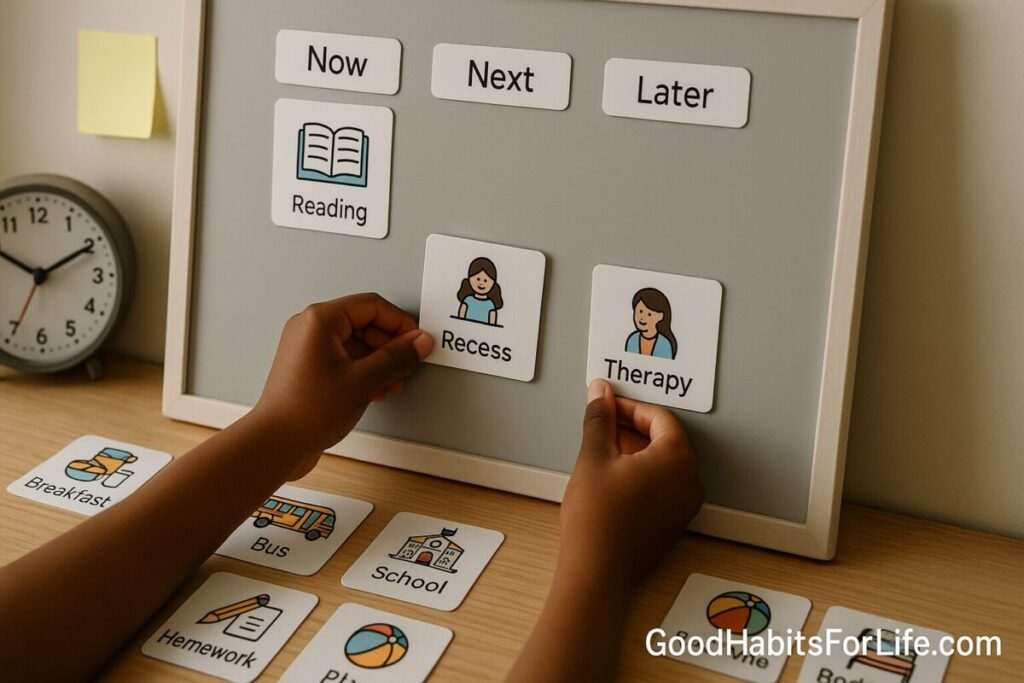
Visual Schedules for Learners: See Your Day
Visual Schedules for Learners: See Your Day
Table of Contents
🧭 What & Why
What is a visual schedule?
A visual schedule is a step-by-step plan of the day (or task) shown with pictures, words, or symbols. It externalizes time and sequence so learners can “see” what’s now, next, and later—reducing working-memory load and easing transitions.
Why it helps.
-
Predictability: Lowers uncertainty and transition friction; learners know what to expect and when it ends. IRIS
-
Executive function support: Shifts steps from memory to the environment; learners use less cognitive effort to start/sequence tasks and more on doing them. EEF+1
-
Evidence base: Visual supports/schedules are established practices for autistic learners and are aligned with Universal Design for Learning (UDL) for all students. Recent updates (UDL 3.0, 2024) emphasize flexible representation and supports like visual scaffolds. afirm.fpg.unc.edu+2ncaep.fpg.unc.edu+2
-
Beyond autism: Systematic reviews show visual activity schedules can reduce problem behaviors and support on-task behavior in ADHD and mixed populations. PMC+1
✅ Quick Start (Do This Today)
-
Pick a scope: Start with one routine that repeats daily (e.g., “Before-school” or “Independent Writing Block”).
-
Break into 4–7 steps: Each step is a single action (e.g., “Open notebook,” “Write title,” “Timer 10 min,” “Check with rubric”).
-
Choose visuals: Use simple icons/words learners already know. Keep a consistent look (same color, shape, font).
-
Build the strip/board: Left-to-right or top-to-bottom; add a “Finished” box for completed items.
-
Add time cues: Pair with a visual timer (sand-timer style or digital pie) for bounded work intervals.
-
Rehearse the sequence: Model once; do one guided run-through.
-
Fade adult prompts: Point to the schedule; let the schedule do the talking.
-
Reflect briefly: End with two questions: “What went well?” “What’s one tweak?”
Pro tip: If attention flags, shrink steps or add a mid-routine micro-break card (1–2 min stretch/drink).
🗓️ 7-Day Starter Plan
Day 1 – Pick a routine & template
Define the goal, list 4–7 steps, gather icons, and print/laminate or set up in an app.
Day 2 – Teach & model
Explain why/when to use it; run a full practice with generous prompting.
Day 3 – First independent run
Prompt only by pointing to the schedule; log what needed help.
Day 4 – Tighten steps & add timer
Merge tiny steps; attach a visual timer; teach “pause → check schedule → continue.”
Day 5 – Introduce “finished” rituals
Learner moves each step to Finished; do a 1-minute reflection.
Day 6 – Generalize
Use the same schedule in a second setting or time of day.
Day 7 – Review & adjust
Short retro: what to keep, cut, or reorder. Set next week’s focus (e.g., learner self-checks).
🧠 Techniques & Frameworks (That Stick)
1) UDL-aligned design
-
Multiple representations: Pair icons with short text.
-
Chunking: 4–7 steps = sweet spot for working memory.
-
Scaffold then fade: Move from photo → icon → word-only as fluency grows. udlguidelines.cast.org+1
2) AFIRM 3-step cycle: Plan → Use → Monitor
-
Plan: Define target routine, materials, roles, and success criteria.
-
Use: Teach the schedule, model, prompt by pointing, and reinforce completion.
-
Monitor: Track independence, time-on-task, and prompt levels; adjust visuals. afirm.fpg.unc.edu+1
3) Metacognitive wrap
Close each session with two questions: “What helped?” “What will I try next time?” This builds self-regulation and transfer across classes. EEF+1
4) Visual + temporal pairing
Always pair the schedule with a timer so time doesn’t become an invisible stressor.
5) Errorless start
For new users, make the first 1–2 cards instantly doable (“Sit,” “Open book”) to create momentum.
6) Choice points
Add small choice icons (e.g., pick seat, pick pen color) to improve buy-in without derailing sequence.
👥 Audience Variations
Students (primary & middle):
-
Use photos of the child’s own materials initially.
-
Add “I-need-help” card the learner can hand to adults.
Teens:
-
Move to minimalist icons and phone widgets; protect privacy with neutral labels.
-
Add self-check rubrics (e.g., 3-point scale) after key steps.
Professionals (college/adults):
-
Convert to Kanban (To-Do/Doing/Done) with 25–50-minute focus blocks.
-
Use calendar blocks + checklist for labs, clinicals, or studio sessions.
Parents/Caregivers:
-
Morning/bedtime routines on the fridge; include “buffer” cards (e.g., traffic, elevator).
-
Keep a portable “Now/Next” card for errands and transitions.
Neurodivergent learners (autism/ADHD):
-
Start concrete (photos), explicit time boxes, and clear “all done” closure.
-
For ADHD, intersperse micro-rewards (stickers, song snippet) after 2–3 cards. PMC
⚠️ Mistakes & Myths to Avoid
-
Too many steps. Over-detailed schedules become noise; consolidate.
-
Changing icons daily. Consistency beats cleverness.
-
Talking over the schedule. Point to the next card; let visuals lead.
-
Assuming it’s “only for autism.” Visuals help many learners and are UDL-aligned. udlguidelines.cast.org
-
No “finished” box. Closure matters—crossing off or moving cards is reinforcement.
-
Skipping review. A 1-minute recap cements metacognition. EEF
🗣️ Real-Life Examples & Scripts
Classroom transition (Now/Next/Then):
-
Adult: “Now reading. Next partner share. Then art.”
-
Prompt: (point to the strip) “What’s next?”
-
Learner: “Partner share.” → Moves “reading” to Finished.
Independent writing block (10 minutes):
Cards: “Open notebook → Title → Timer 10 → Checklist 3-items → Share → Finished.”
-
Adult: “Point to your next step.”
-
Learner: “Checklist.”
Morning routine (home):
Cards: “Brush → Dress → Bag → Snack box → Shoes → Door.”
-
Parent: “Pick any sticker after Door.”
Exam study sprint (teen):
Cards: “Open unit outline → 15-min recall → 5-min check → 10-min practice Qs → Log 1 insight.”
-
Reflection: “What helped focus today?”
🛠️ Tools, Apps & Resources (Pros/Cons)
| Tool | Best For | Pros | Cons |
|---|---|---|---|
| Paper strip + laminated cards | Young learners, low-tech | Tactile, durable, zero setup | Prep time; need printer/laminator |
| Magnetic/Velcro board | Class centers, special rooms | Fast rearrange, highly visible | Space on walls; materials cost |
| Visual timer (physical or app) | Any setting | Makes time concrete; reduces “how long?” | Needs teaching/fading |
| Phone/tablet schedule apps (e.g., simple checklist/kanban) | Teens/adults | Portable, notifications, widgets | Distraction risk; privacy settings |
| Digital whiteboard (class display) | Whole-class routines | Big, shared, easy to tweak | Not portable between rooms |
| Icons & templates (create your own) | Branding/consistency | Reusable packs; quick edits | Initial build effort |
Tip: Keep a “starter kit”: cardstock, laminator, hook-and-loop dots, icon set, mini visual timer.
📚 Key Takeaways
-
Visual schedules turn time and tasks into something learners can see, reducing anxiety and boosting independence. IRIS
-
They’re evidence-based for autistic learners and broadly helpful via UDL for everyone. afirm.fpg.unc.edu+1
-
Start small (4–7 steps), be consistent, pair with a visual timer, and end with a 1-minute reflection. EEF
-
Choose the lowest-friction format (paper, app, or hybrid) and review weekly to keep it working.
❓ FAQs
1) Do visual schedules work only for autism?
No. They’re well-established for autistic learners and also support ADHD/executive-function and general classrooms through UDL design. PMC+1
2) Should I use photos or icons?
Start concrete (photos) for new users; fade toward icons/words as independence grows. IRIS
3) How many steps belong on one schedule?
Aim for 4–7. If it’s longer, make sub-schedules or modules.
4) What if a learner skips steps or resists?
Teach, model, and prompt by pointing to the schedule. Add quick wins at the start and include a micro-break card.
5) How do I prevent over-reliance?
Fade prompts first (adult → gesture → independent), then simplify visuals (photo → icon → word), and finally compress steps. afirm.fpg.unc.edu
6) Can I use one schedule for a whole class?
Yes—display a class visual timetable and give individuals a smaller Now/Next strip as needed. IRIS
7) Where does metacognition fit?
Add a 1-minute end-of-routine reflection to build planning, monitoring, and evaluation habits. EEF
8) Paper or digital—what’s best?
The “best” is what the learner uses consistently. Many settings succeed with hybrid (wall display + small personal strip).
References
-
AFIRM (UNC FPG). Evidence-Based Practice Modules — Visual supports overview and implementation steps. https://afirm.fpg.unc.edu/ afirm.fpg.unc.edu
-
AFIRM Modules: Plan–Use–Monitor framework and handouts. https://afirm.fpg.unc.edu/afirm-modules/ afirm.fpg.unc.edu
-
CAST. UDL Guidelines 3.0 (released July 30, 2024). https://udlguidelines.cast.org/ udlguidelines.cast.org
-
IRIS Center (Vanderbilt). Use Visual Supports (practical classroom guidance). https://iris.peabody.vanderbilt.edu/module/dll/cresource/q3/p06/ IRIS
-
Education Endowment Foundation. Metacognition and Self-Regulated Learning (guidance). https://educationendowmentfoundation.org.uk/education-evidence/guidance-reports/metacognition EEF
-
Thomas, N. et al. (2022). The Efficacy of Visual Activity Schedule Intervention in Children with ADHD (systematic review). https://pmc.ncbi.nlm.nih.gov/articles/PMC8733412/ PMC
-
NCAEP (UNC FPG). Autism Evidence & Practice; Visual Supports among EBPs. https://ncaep.fpg.unc.edu/ ncaep.fpg.unc.edu
-
IRIS Center. Early Childhood Communication Strategies: Visual Supports & PECS. https://iris.peabody.vanderbilt.edu/module/asd2/cresource/q2/p04/ IRIS
-
Liang, Z. (2024). Use of visual schedules to increase academic-related behaviors (review). https://www.tandfonline.com/doi/full/10.1080/20473869.2024.2402124 Tandfonline
Disclaimer: This guide is educational and not a substitute for individualized clinical, therapeutic, or IEP advice.