
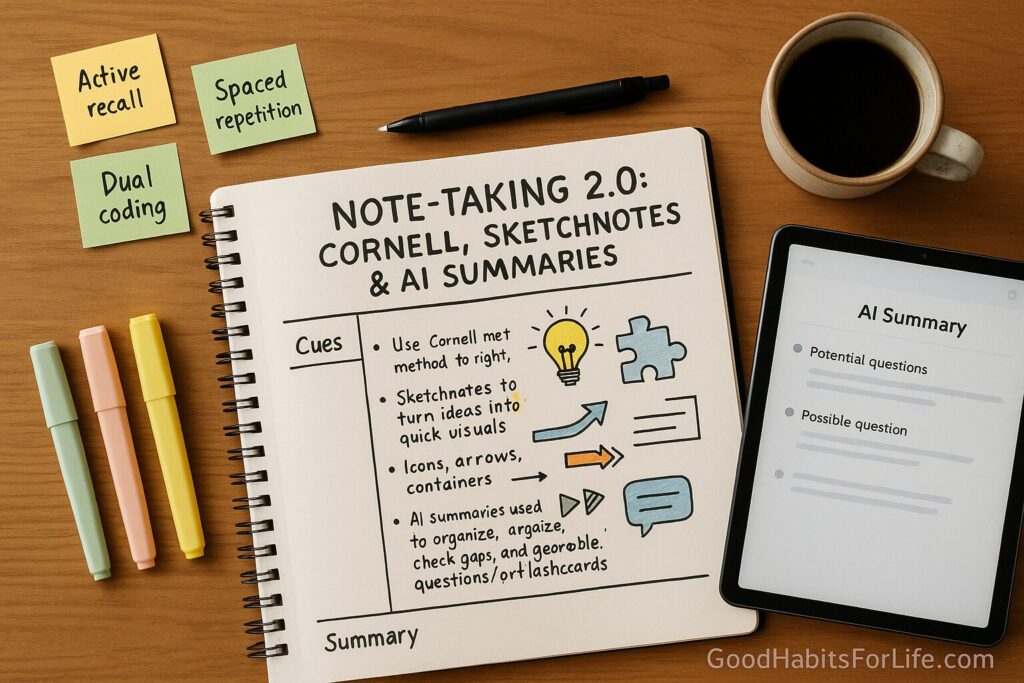
NoteTaking 2.0: Cornell, Sketchnotes, and AI Summaries
Note-Taking 2.0: Cornell, Sketchnotes & AI Summaries
Table of Contents
🧭 What & Why
Note-Taking 2.0 blends three proven elements:
-
Cornell method to structure notes (cues on the left, notes on the right, summary at the bottom).
-
Sketchnotes to turn ideas into quick visuals (icons, arrows, containers) that leverage dual-coding—words + images improve memory.
-
AI summaries used carefully to organize, check gaps, and generate possible questions/flashcards—not to replace your brain.
Why it works
-
Active recall & spacing reliably improve long-term retention compared with rereading or highlighting.
-
Dual-coding (text + visuals) makes abstract ideas stick.
-
Handwriting can reduce verbatim copying and support deeper processing than typing during lectures.
-
Cognitive load management: a clear layout and simple visuals free working memory for understanding.
✅ Quick Start: Do This Today
-
Create a Cornell page (paper or tablet):
-
Left 6–7 cm: Cues/Questions
-
Right: Notes
-
Bottom 5–7 lines: Summary
-
-
During class/reading
-
Capture big ideas, definitions, steps, examples.
-
Use bullets, abbreviations, arrows, and tiny sketches for processes/links.
-
Mark confusing points with a “?”.
-
-
Right after (≤10 minutes)
-
Fill the Cue column with questions (“Why does X cause Y?”).
-
Write a 3–5 sentence summary in your own words.
-
-
Same day (evening, 5–10 min)
-
Cover-cue-recite: cover the right column and answer from memory using your cues.
-
Add/clarify anything you missed.
-
-
Use AI (optional, 5 min)
-
Paste your own summary + cues and ask: “Suggest 5 quiz questions I can answer from these notes” or “Check if I missed key definitions.”
-
Don’t paste sensitive info. Verify anything new before adding.
-
🗺️ 7-Day Starter Plan
Day 1 – Set up
-
Print or template 5 Cornell pages.
-
Build a visual vocabulary (10 simple icons: idea 💡, example ★, cause→effect, time ⏱️, list, person, compare ↔, caution !, formula ƒ, step ➟).
Day 2 – First lecture/reading
-
Take Cornell notes + two quick sketches (e.g., a flow or compare/contrast).
Day 3 – Review & quiz
-
Cover-cue-recite for 10 minutes.
-
Ask AI for 5 practice questions from your summary only; answer without reading.
Day 4 – Improve visuals
-
Add 2 more icons; redraw one dense section as a simple diagram.
Day 5 – Second class
-
Repeat. End with a bottom summary and 5 cues.
Day 6 – Spaced review
-
10–15 minutes: mix Day 2 + Day 5 notes. Convert 5 cues to flashcards.
Day 7 – Mini-exam
-
Self-test from cues; explain a key idea to a friend (Feynman style).
-
Tweak what didn’t work (pace, abbreviations, margins).
🧠 Techniques & Frameworks
🗂️ Cornell Method—Structure That Teaches You
-
Right column (Notes): key ideas, steps, examples, diagrams.
-
Left column (Cues): questions, prompts, keywords—your future quiz items.
-
Bottom (Summary): 3–5 sentences that answer: What did I learn? Why does it matter? How does it connect?
Workflow
-
During input: concise bullets + sketches.
-
Immediately after: craft questions (higher-order too: why/how/compare).
-
Review: cover right column; answer out loud using cues; check; refine.
🔁 Active Recall & Spaced Repetition
-
Active recall: retrieve answers without looking (cover-cue-recite, flashcards, two-minute oral summary).
-
Spacing: short reviews at 24 h → 7 days → 30 days beat one long cram.
-
Use apps or a paper calendar to schedule. Aim for 10–15 minutes/session.
✏️ Sketchnotes—Make Ideas Visible
Keep it simple and fast:
-
Icons: concept (💡), process (→), compare (↔), hierarchy (▤), example (★), warning (!).
-
Containers: boxes/clouds for definitions; swimlanes for timelines.
-
Connectors: arrows for cause-effect; dotted lines for loose links.
-
Typography: big for headings, small for detail; emphasize with underlines or thickened strokes.
-
Color: optional; one highlighter for definitions and one for formulas is enough.
When to sketch
-
Processes, cycles, comparisons, part-whole diagrams, timelines.
-
If you can’t draw it in ≤15 seconds, write it.
🤖 AI Summaries—Use Carefully
Great for
-
Turning your own notes into checklists, exam-style questions, or flashcard stems.
-
Re-organizing messy notes into headings (don’t accept new facts blindly).
-
Drafting a one-paragraph abstract from your bottom summary.
Rules
-
Privacy: don’t paste personal data or restricted content.
-
Verification: if AI introduces a fact not in your notes or textbook, verify it with a trusted source before adding.
-
Attribution: keep page numbers or links in your notes; AI can help format citations, but you must confirm them.
Prompts you can copy
-
“From my summary below, create 8 quiz questions from easy→hard. Don’t add outside facts.”
-
“Re-order these bullets into Cornell-style cues (left) and key points (right). Keep wording mine.”
-
“Turn these definitions into 10 flashcards (front/back).”
📚 Reading & Lecture Tactics
-
Preview headings and bold words; predict 2–3 questions you expect to answer.
-
Use PQ4R/SQ3R (Preview, Question, Read, Reflect/Recite, Review).
-
During fast lectures, write keywords + gaps; after class, fill gaps with the textbook or a peer’s notes.
👥 Audience Variations
Teens & Students
-
Keep pages short (one topic per page).
-
Use a cue target: ≥8 cues per hour of class.
-
For math/science, sketch diagrams and units; keep a formula box.
Parents (supporting a student)
-
Check for the bottom summary; ask the student to explain one cue aloud.
-
Encourage weekly 20-minute review appointment.
Teachers
-
Share a Cornell template; pause for cue-writing breaks (2 minutes).
-
Provide “big questions” at the start of class to prime cues.
Professionals
-
Use Cornell for meetings; bottom summary becomes action items.
-
Sketchnote workflows, timelines, or decision trees on one page.
⚠️ Mistakes & Myths to Avoid
-
Typing everything verbatim—understanding drops.
-
Highlighting-only study—looks productive, doesn’t stick.
-
Learning-styles myth: tailoring to “visual/auditory/kinesthetic” has weak evidence; use multiple modalities (words + visuals) instead.
-
Blind trust in AI: hallucinations happen; treat AI outputs as drafts to audit.
-
Skipping the summary: the bottom box is your fastest learning ROI.
-
No spacing: one review right away, then at 1 week, then monthly.
📝 Real-Life Templates & Scripts
Cornell Page (example)
Topic: Photosynthesis
Cues (left)
-
Define photosynthesis.
-
Where does the light-dependent reaction occur?
-
Why is chlorophyll important?
-
Equation? Units?
-
Compare C3 vs C4.
Notes (right)
-
Process converting light energy → chemical energy (glucose).
-
Light-dependent in thylakoid membranes; produces ATP + NADPH; releases O₂.
-
Chlorophyll absorbs blue/red wavelengths; drives electron transport.
-
Overall (balanced): 6CO₂ + 6H₂O → C₆H₁₂O₆ + 6O₂ (in presence of light).
-
C4 plants minimize photorespiration using bundle sheath; efficient in high light/heat.
Bottom Summary
Photosynthesis has two stages; light reactions make ATP/NADPH, Calvin cycle fixes CO₂ into glucose. Chlorophyll captures energy; plant types vary (C3/C4) for efficiency.
Sketchnote Moves
-
Draw sun → leaf → glucose box with arrows; label ATP/NADPH.
-
Use ↔ to compare C3 vs C4; add a tiny thermometer icon for heat-tolerant.
AI Prompt Scripts
-
“Here are my cues + summary on photosynthesis. Generate 10 practice questions from only this content, Bloom’s levels mixed.”
-
“Turn my summary into an Anki .csv (front/back) without adding facts.”
🧰 Tools, Apps & Resources (pros/cons)
-
Paper + binder — tactile, zero distraction; harder to search.
-
OneNote / Apple Notes / Google Docs — easy sharing/search; avoid long verbatim typing.
-
GoodNotes / Notability (tablet) — handwriting + shape tools; mind the temptation to over-decorate.
-
Obsidian / Notion — powerful linking/databases; setup time needed.
-
Anki / RemNote — spaced-repetition flashcards; best with your own cues.
-
Readwise / Zotero — collect highlights/citations; great for research papers.
Tip: Whatever you choose, lock in the Cornell layout and schedule reviews.
📌 Key Takeaways
-
Structure (Cornell) + memory science (recall + spacing) + light visuals (sketchnotes) = durable learning.
-
Keep AI in a support role: reorganize, quiz, and format—not to invent content.
-
Summarize the same day and review at 1 day/1 week/1 month.
-
Build a tiny icon set; draw fast, not fancy.
-
One topic per page; 8+ cues per class; 3–5 sentence bottom summary.
❓ FAQs
1) Is handwriting really better than typing?
Often, yes. Handwriting tends to reduce verbatim copying and pushes you to summarize, which supports learning—especially in concept-heavy classes.
2) How do I study from Cornell notes?
Cover the right column and answer from cues; check; fill gaps; then do a spaced review (24 h → 7 days → 30 days).
3) What if the teacher talks too fast?
Capture keywords and structures (lists, arrows, diagrams). After class, fill gaps using peers or the text; write cues and a summary immediately.
4) Can I do this on a laptop or tablet?
Yes. Use a Cornell template and avoid verbatim typing. Tablets with a stylus make sketches easy.
5) How many cues should I make?
Aim for 1–2 cues per major idea; roughly 8–12 cues per hour of class.
6) How can AI help without hurting?
Feed it your summaries/cues; ask for practice questions or flashcards limited to your text. Verify anything new.
7) I’m bad at drawing—can I still sketchnote?
Absolutely. Use simple shapes and arrows. Speed matters more than beauty.
8) How long should my notes take to review?
Most classes: 10–15 minutes the same day, 10 minutes at 1 week, and a 5-minute monthly skim.
9) Does color-coding help?
A little. Use one highlight color for definitions and another for formulas—don’t overdo it.
📚 References
-
Cornell University Learning Strategies Center. The Cornell Note-Taking System. https://lsc.cornell.edu/how-to-study/taking-notes/cornell-note-taking-system/
-
Dunlosky, J., et al. (2013). Improving Students’ Learning with Effective Learning Techniques. Psychological Science in the Public Interest. https://journals.sagepub.com/doi/10.1177/1529100612453266
-
Mueller, P.A., & Oppenheimer, D.M. (2014). The Pen Is Mightier Than the Keyboard. Psychological Science. https://journals.sagepub.com/doi/10.1177/0956797614524581
-
NSW CESE (2017). Cognitive Load Theory: Research that teachers really need to understand. https://www.cese.nsw.gov.au/publications-filter/cognitive-load-theory
-
University of Waterloo CTE. Dual Coding and Learning. https://uwaterloo.ca/centre-for-teaching-excellence/teaching-resources/teaching-tips/educational-technologies/all/dual-coding-and-learning
-
Cepeda, N.J., et al. (2008). Spacing Effects in Learning. Psychological Science. https://www.ncbi.nlm.nih.gov/pmc/articles/PMC2657659/
-
Pashler, H., et al. (2008). Learning Styles: Concepts and Evidence. Psychological Science in the Public Interest. https://journals.sagepub.com/doi/10.1111/j.1539-6053.2009.01038.x
-
Ji, Z., et al. (2023). A Survey on Hallucination in NLP. ACM Computing Surveys. https://dl.acm.org/doi/10.1145/3571730
-
Maynez, J., et al. (2020). On Faithfulness and Factuality in Abstractive Summarization. https://arxiv.org/abs/2005.00661
-
Harvard Bok Center for Teaching and Learning. Note-Taking and Notebooks. https://bokcenter.harvard.edu/note-taking